About this app
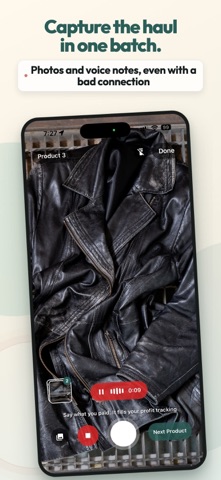
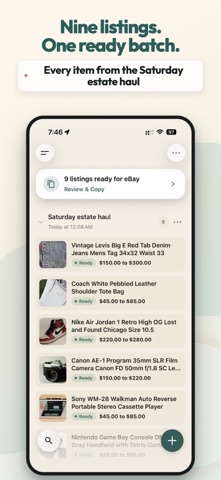
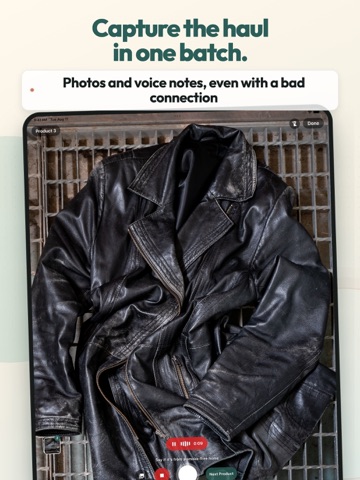
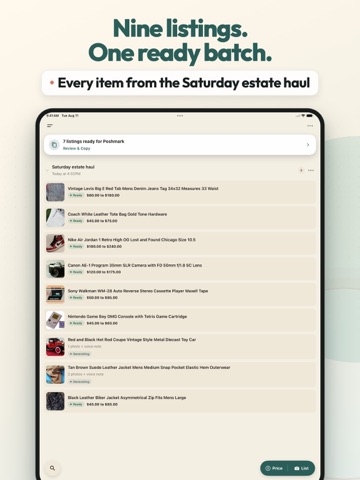
Check the price before you list. Shelvio is an AI listing and price-check app built for resellers. Photograph an item or scan its barcode to see a value range from comparable listings, with recently sold prices clearly labeled when available. If it is worth buying, turn that saved check into a listing draft. Then capture the rest of the haul in one batch. Photos and optional voice notes become complete draft listings with titles, descriptions, categories, condition, keywords, pricing notes, and a suggested price. PRICE CHECK WHILE YOU SOURCE At a thrift store, estate sale, flea market, or garage sale: 1. Take a photo or scan a barcode. 2. See the middle range, median, and average from comparable listings, with recently sold prices clearly labeled. 3. Save the check to your history. 4. Bought it? Start a listing from that check and add the photos buyers need. Asking prices are not sold prices or appraisals. Shipping is not included, and marketplace prices can change. Review the comparable items before you buy or price yours. LIST A WHOLE HAUL IN ONE BATCH Start a batch for a thrift haul, estate pickup, closet cleanout, or weekly listing day. Photograph each item, say the measurements, flaws, tag details, source, cost, or shelf location, then move to the next product. Shelvio drafts listings in the background while you keep shooting. List mode can capture photos and voice notes in a basement, storage unit, or other dead zone, then upload and generate when your connection returns. REVIEW BEFORE ANYTHING GOES LIVE Every AI listing is a draft. Check the title, condition, measurements, category, price, and description before you use it. Connect an eBay seller account to review eBay's category and required item specifics, then publish only when you tap Publish. For Poshmark, Mercari, Depop, Etsy, Facebook Marketplace, and other selling apps, Review & Copy walks through photos, title, description, condition, and price without making you retype the same listing. KNOW WHAT SOLD AND WHAT IT EARNED Record what you paid, the sale price, fees, and shipping. See profit and margin for each sold item. Reports show revenue, net profit, days to sell, sell-through, and which sourcing batches paid off. Mark an item sold and Shelvio shows where the same item is still live, so you can remove the other listing before it sells twice. Save a bin or shelf location so the sold item does not turn into a search through every tote. MADE FOR iPAD See your whole batch beside the item you are editing in a true split view. Works great with a hardware keyboard: arrow through listings, copy fields, and search without touching the screen. On Mac, Shelvio runs as a real resizable window. BUILT FOR RESELLERS - Batch capture for 15, 30, or 40+ item hauls - Optional voice notes for flaws, measurements, provenance, and tag details - Barcode details for books, games, and packaged goods - Named batches, SKUs, listing links, purchase source, and storage location - Search across the items you captured - CSV export for spreadsheets and tax prep - The same workspace on iPhone, iPad, and the web YOUR DATA Photos and voice notes are used to provide Shelvio's features, including generating your drafts. They are not used to train AI models. You can replay retained voice notes in the app and delete a listing or your whole account at any time. SUBSCRIPTION Unlimited price checks and listings are available with an auto-renewable subscription for normal individual reselling, subject to fair use. Current plans and prices are shown in the app. Payment is charged to your Apple Account. Subscriptions renew automatically unless canceled at least 24 hours before the period ends. Manage or cancel in your Apple Account settings. Terms of Service: https://shelvio.ai/terms-of-service/ Privacy Policy: https://shelvio.ai/privacy-policy/ Questions? support@shelvio.ai
Latest release
What’s New
• Smarter suggested prices. When recent sales exist for your item, the price range comes from what actually sold. • Review & Copy lets you set items aside for a queue without removing them, and bring them back with one tap. • Bug fixes and performance improvements.
Audience growth
Ratings growth
Baseline captured. Growth appears after the crawler observes a changed rating count.
Momentum comes from crawler snapshots for the tracked storefront. “Viral growth signal” means unusually fast recent rating gains; it is an indicator, not download data.
Price tracking
Price intelligence
First snapshot captured. The trend line starts after the next crawler price observation.
- First observed Sep 6, 2026 · 9:57 PM Free
Screenshots