About this app
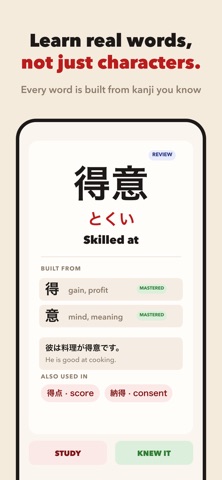
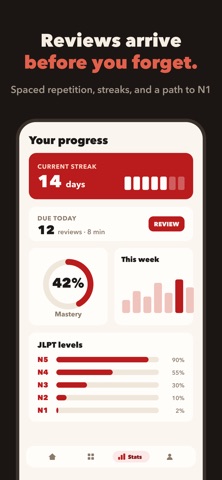
Learning Japanese Kanji used to be a grind. Not anymore. Welcome to Kanji Swipe - the fastest, most engaging way to memorize all 2,136 Joyo Kanji from JLPT N5 to N1. By combining a hyper-addictive swipe interface with a scientifically proven Spaced Repetition System (SRS), you'll learn faster, retain more, and actually look forward to your daily study sessions! HOW IT WORKS: Swipe Right if you know the Kanji. Swipe Left if you need to study it. Swipe Up to instantly "Master" Kanji you already know! The app learns what you struggle with and automatically schedules review cards precisely when you're about to forget them. CORE FEATURES: All 2,136 Joyo Kanji: Carefully organized by JLPT levels (N5, N4, N3, N2, N1) so you can study exactly what you need for your exams. Smart Spaced Repetition (SRS): A highly optimized SM-2 algorithm guarantees maximum memory retention by testing you at the perfect intervals. Interactive Quizzes: Go beyond memorization. Test your knowledge with Meanings, Kanji Recognition, and contextual Fill-in-the-Blank sentences featuring Furigana! Detailed Analytics: Track your daily streaks, weekly study hours, accuracy percentage, and level mastery over time. Lightning Fast & Offline: Fully native, beautifully designed, and works 100% offline. Study on the subway, on a flight, or anywhere else. PERFECT FOR: Beginners taking their very first steps into Japanese (Start at N5!) Advanced learners preparing for the JLPT N2 or N1 who need an efficient review tool. Anyone tired of boring, cluttered flashcard apps who wants a modern, satisfying study experience. Stop dreading your Kanji practice. Start swiping, build your streak, and unlock fluency today! KANJI SWIPE PRO Kanji Swipe is free to download and use for JLPT N5 with a daily limit of 10 new cards. To unlock the ultimate learning experience, you can upgrade to Kanji Swipe Pro (available as a monthly subscription or a one-time lifetime purchase), which includes: Unlimited Daily Cards: Learn as fast as you want with no daily limits. All JLPT Levels: Unlock full access to N4, N3, N2, and N1 kanji. Advanced Stats & Export: Get detailed insights into your learning and export your data. Themes & Dark Mode: Customize your learning environment. Advanced SRS Control: Access Cram mode and custom intervals. Subscription Terms: Payment will be charged to your Apple ID account at the confirmation of purchase. The monthly subscription automatically renews unless it is canceled at least 24 hours before the end of the current period. Your account will be charged for renewal within 24 hours prior to the end of the current period. You can manage and cancel your subscriptions by going to your account settings on the App Store after purchase. Terms of Use (EULA): https://www.apple.com/legal/internet-services/itunes/dev/stdeula/
Latest release
What’s New
- UI upgrade - Card review logic updated
Audience growth
Ratings growth
Baseline captured. Growth appears after the crawler observes a changed rating count.
Momentum comes from crawler snapshots for the tracked storefront. “Viral growth signal” means unusually fast recent rating gains; it is an indicator, not download data.
Price tracking
Price intelligence
First snapshot captured. The trend line starts after the next crawler price observation.
- First observed Aug 27, 2026 · 6:34 PM Free
Screenshots