About this app
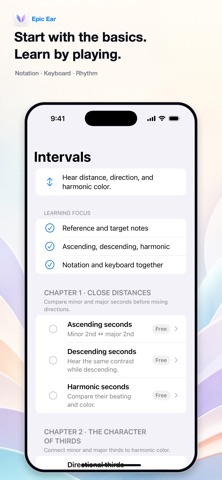
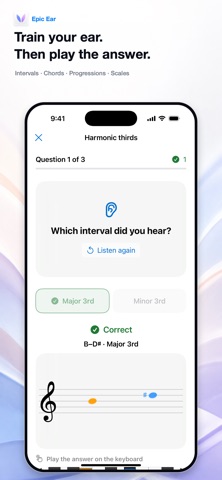
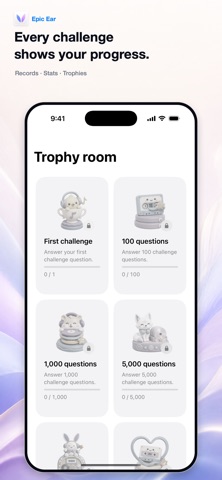
Epic Ear connects listening, notation, and the piano keyboard in one music-learning experience. Go beyond repeating sounds. See what you heard on the staff, find it on the keyboard, and build musical understanding with your ears, eyes, and hands. Start even if you are new to music Learn the staff, clefs, note names, rhythm, intervals, chords, progressions, and scales step by step. Guided scenes combine clear explanations with listening and hands-on interaction. Learn → Practice → Challenge • Learn: understand each concept through visual, interactive lessons. • Practice: repeat complete listening loops with reference sounds, piano, metronome, and spoken guidance. • Challenge: answer by ear, reveal the notation and keyboard, then play the answer yourself. Intervals, chords, progressions, and scales Four official curricula take you from foundations to advanced material. During training, notes on the staff and keys on the keyboard animate with the actual sound. Pause to inspect, replay the current loop, or move through the timeline. Build training around your goals Choose musical materials and playing styles to create custom training loops. Organize them in folders, add the loops you need to playlists, and keep listening across the app. See your progress Track challenge attempts, all-time and recent accuracy, mastery, challenge activity days, and challenge streaks. Long-term milestones unlock playful collectible trophies and animated celebrations. Explore freely in Playground Play the keyboard and explore the relationships between sound, notation, intervals, and chords at your own pace. Included for free • The complete Fundamentals course • Interval Chapters 1–4 • Chord Chapters 1–3 • Progression Chapters 1–3 • Scale Chapters 1–3 • Playground • Two custom training loops Epic Ear Pro unlocks the remaining official curriculum and unlimited custom loop creation and playback. If Pro ends, additional loops are never deleted; they remain safely stored in an inactive state. More features • Adjustable tempo, master volume, and per-track sound balance • Background playback with Lock Screen and Control Center controls • English, Korean, and Japanese • VoiceOver keyboard navigation and Dynamic Type support • No separate account required Privacy Policy: https://drfranken.net/apps/EpicEar/privacyPolicy_en.html Terms of Use: https://www.apple.com/legal/internet-services/itunes/dev/stdeula/
Latest release
What’s New
This update includes bug fixes and stability improvements for a smoother Epic Ear experience.
Audience growth
Ratings growth
Baseline captured. Growth appears after the crawler observes a changed rating count.
Momentum comes from crawler snapshots for the tracked storefront. “Viral growth signal” means unusually fast recent rating gains; it is an indicator, not download data.
Price tracking
Price intelligence
First snapshot captured. The trend line starts after the next crawler price observation.
- First observed Aug 18, 2026 · 7:40 PM Free
Screenshots