About this app
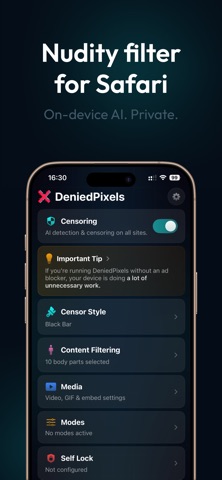
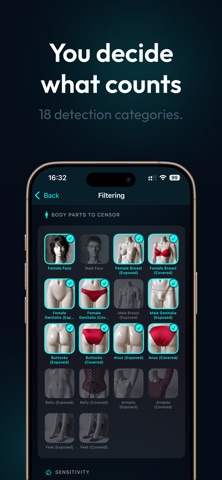
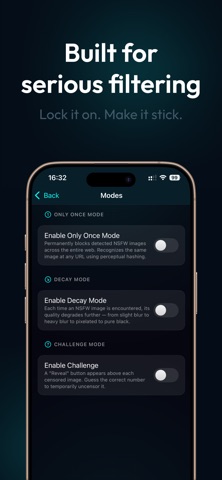
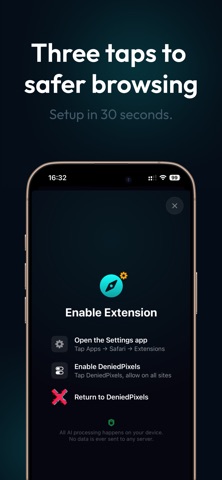
DeniedPixels is a browser extension that uses on-device AI to detect and filter sensitive content in real time as you browse. All processing happens locally on your device - no data is sent to any server. Features: - Real-time content detection on images and videos - 18 censoring styles including black bars, blur, pixelate, glitch, and animated effects - Fully on-device AI - your browsing stays private - Customizable sensitivity and detection settings - Works across websites - Only Once, Challenge, Decay and Beta TV modes How to get started: 1. Open Settings → Safari → Extensions 2. Enable DeniedPixels 3. Grant permissions for your preferred sites 4. Browse with content filtering active Requires iOS 17 or later. Terms of Use (EULA): https://www.apple.com/legal/internet-services/itunes/dev/stdeula/ Terms and Conditions: https://deniedpixels.com/terms-and-conditions/ Privacy Policy: https://deniedpixels.com/privacy-policy/
Latest release
What’s New
- Fixes for google images search - Added Focus Zone support for presets - Added silhouette support for videos - Improvements for BetaTV - Unified pixels size across different media on pixelate styles - Adding back redeveloped blur style, now works with videos
Audience growth
Ratings growth
Baseline captured. Growth appears after the crawler observes a changed rating count.
Momentum comes from crawler snapshots for the tracked storefront. “Viral growth signal” means unusually fast recent rating gains; it is an indicator, not download data.
Price tracking
Price intelligence
- First observed Aug 14, 2026 · 9:51 AM Free
Screenshots