About this app
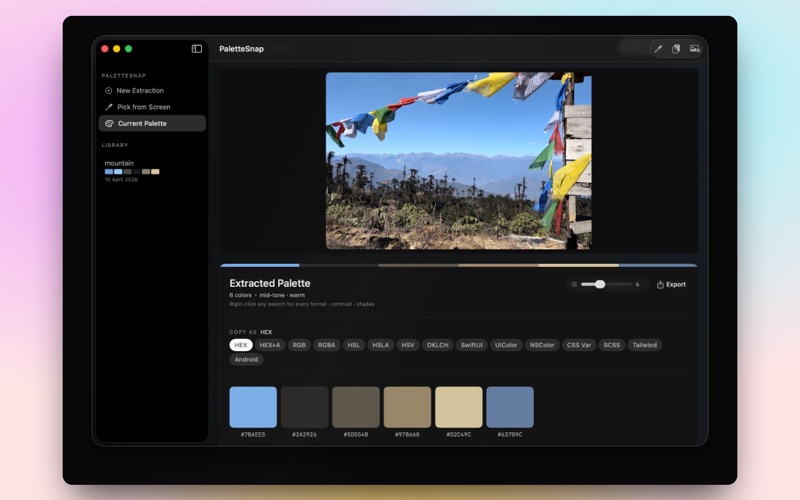
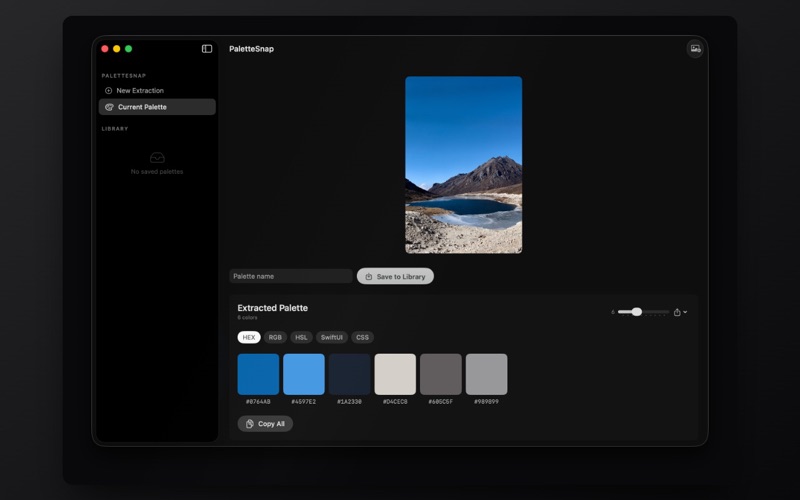
PaletteSnap extracts beautiful color palettes from any image using intelligent color science. Drop an image, get a stunning palette. It’s that simple. Designers, developers, and creatives — stop guessing colors. PaletteSnap uses K-means clustering to find the true dominant colors in any photograph, illustration, or design reference, then gives you those colors in every format you need. EXTRACT COLORS INTELLIGENTLY • K-means++ clustering algorithm for accurate color extraction • Adjustable palette size: 3 to 12 colors • Colors sorted by dominance — most prominent first • Automatic downsampling for instant results, even on large images EVERY FORMAT YOU NEED • HEX: #RRGGBB for web and design tools • RGB: rgb(r, g, b) for CSS and web development • HSL: hsl(h, s%, l%) for color theory workflows • SwiftUI: Color(red:, green:, blue:) for Apple developers • CSS: Ready-to-paste web values • Click any color to copy instantly. Click “Copy All” for the entire palette. PROFESSIONAL EXPORT • PNG Swatch Card: A visual palette card with color swatches and hex labels — perfect for mood boards, client presentations, or design documentation • JSON: Structured export with hex, RGB, and HSL values for developers • ASE (Adobe Swatch Exchange): Import directly into Photoshop, Illustrator, InDesign, and other Adobe Creative Suite apps SAVE & ORGANIZE PALETTES • Save palettes with custom names to your library • Browse saved palettes in the sidebar with mini swatch previews • Rename, delete, or reload any saved palette • Your library persists across sessions DRAG & DROP WORKFLOW • Drag any image onto the app — PNG, JPEG, TIFF, BMP, GIF, or HEIC • Or use the file picker (Cmd+O) • Results appear instantly BUILT FOR MAC • Native macOS app — fast, lightweight, built with SwiftUI • Dark mode cinematic interface • No account required • No internet connection needed • Your images and palettes stay on your Mac Whether you’re building a brand identity, creating a mood board, choosing UI colors for an app, or finding the perfect palette from a photograph — PaletteSnap gives you the colors in seconds, in every format, ready to use. From DRISH LABS — makers of HashGuard, Image Converter, SpeedPro, KeyBlock, and Telly.
Latest release
What’s New
This update focuses on speed, accuracy, and a refined design experience. • Completely redesigned interface with a cleaner, more intuitive workflow • Significantly faster palette extraction and image processing • Improved colour detection accuracy for more representative palettes • Enhanced K-means clustering for better dominant colour selection • Smoother drag-and-drop experience with faster image loading • Improved handling of large, high-resolution images • Faster export generation for PNG Swatch Cards, JSON, and ASE files • Better colour format conversion across HEX, RGB, HSL, CSS, and SwiftUI • Refined palette management with a more polished save-and-organize workflow • Improved dark mode visuals and overall UI consistency • Reduced memory usage and improved responsiveness throughout the app • Numerous bug fixes, stability improvements, and performance optimizations As always, PaletteSnap remains completely local. Your images never leave your Mac, and no internet connection is required.
Audience growth
Ratings growth
Baseline captured. Growth appears after the crawler observes a changed rating count.
Momentum comes from crawler snapshots for the tracked storefront. “Viral growth signal” means unusually fast recent rating gains; it is an indicator, not download data.
Price tracking
Price intelligence
First snapshot captured. The trend line starts after the next crawler price observation.
- First observed Aug 11, 2026 · 8:25 AM $8.99
Screenshots