About this app
Build the day you want to repeat, and stop rebuilding it every morning. Most days are not new. They have a shape, and your phone should already know it. Welcome to your Routine. No onboarding questionnaire, no streaks to protect, and no collecting of your data. Download it, write out a day once, choose which days it runs, and it fills those days in for you. That's it. Today is the screen you live in. No week strip, no month grid, nothing to navigate. What is happening is in front of you, and anything else that comes up goes straight onto the day. Tomorrow holds every day ahead for a year, already filled in by your routines. Add to any of them. Lift a routine off a single day when life happens, and the rest of the week stays where it is. Someday is for the things with no date yet. Park them, and give them a day when you are ready. Give a block a time, a tag, a reminder, and a place. Name and color your own tags. Ask Siri to run a routine, add a block, or read your day back to you (coming in iOS 27). Put it on your Home Screen and Lock Screen, and open it on iPad and Mac. Your day stays yours. Everything syncs privately through your own iCloud, with no account to create and no one watching. You decide what your days look like, not an algorithm. Build it once, and let it carry you. Download Routine today and see the difference it will make in your life! Terms of Use (EULA): https://www.apple.com/legal/internet-services/itunes/dev/stdeula/
Latest release
What’s New
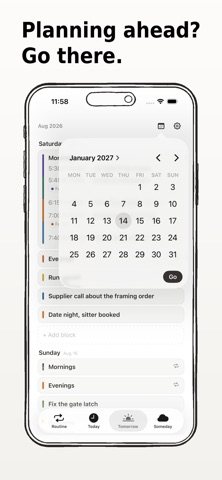
Second update as part of the remodel: • Routine clean up. Adding and editing a routine is now cleaner and more UI friendly • App icon. New checkmarked app icon to resemble completed blocks • Checklist(s) On/Off. If wanted, you can completely turn off the checklist in the app for all routines/blocks. Any routine/block will be auto-completed for the next day from the current day and put in the new Completed section within the Today tab. Importantly, you can turn off the checklist for your routine but keep it for your separate blocks allowing for full customization of your own style. • Completed Blocks/Routines. A completed section in the Today tab that you can look back in history, bring blocks back, and search through • New way to search in the Tomorrow tab. Find the exact day you need to add a block/task instantly and better via a future focused calendar. • Quick Add. On the Home Screen, hold down on the Routine app icon to quickly add a block (for today), save for someday, or see what's tomorrow. • Custom Minutes Increments. Now you can select in Settings to change the timeframes minutes intervals to be 1, 5, 10, 15, or 30 minute intervals when scrubbing time. Further major/minor bug fixes and improvements addressed across the app for both iPhone and iPad done as part of the refresh. MacOS app coming soon... Stay tuned!
Audience growth
Ratings growth
Baseline captured. Growth appears after the crawler observes a changed rating count.
Momentum comes from crawler snapshots for the tracked storefront. “Viral growth signal” means unusually fast recent rating gains; it is an indicator, not download data.
Price tracking
Price intelligence
First snapshot captured. The trend line starts after the next crawler price observation.
- First observed Aug 21, 2026 · 12:37 PM Free
Screenshots