About this app
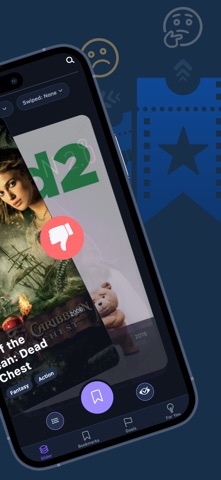
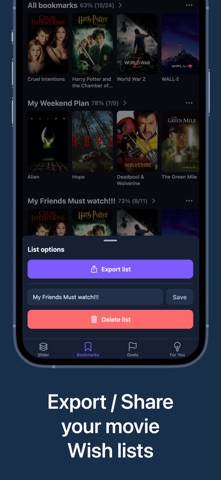
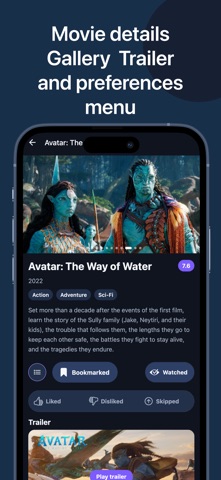
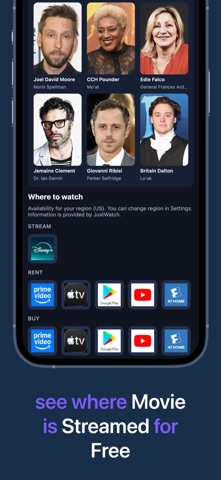
Swipe through movies — like, pass, or skip. Save to your watchlist or mark as watched in one tap. Set watch goals from Top 100 genre lists or lists you build yourself, and follow your progress as you finish films. The more you swipe, the sharper the recommendations the app surfaces for you. HOW IT WORKS Pick a genre and start swiping. Each card shows a real movie scene, title, year, rating, and genres. The more you swipe, the better your recommendations get. YOUR PERSONAL WATCHLIST Tap Remember on any card to save it. Create custom bookmark lists to sort movies however you want — by mood, by genre, for a trip, or for movie night with friends. Every list can be exported as a text file and shared in one tap. Automatic Liked and Watched sections keep your history in one place. All and custom lists show watch progress so you always know how far you've come. SET GOALS AND TRACK PROGRESS The Goals tab lets you follow curated Top 100 lists by genre — or turn any of your bookmark lists into a goal. Mark movies as watched from the slider or movie detail screen, and your progress updates everywhere. Finish a comedy marathon, work through your watchlist, or chase a genre catalog at your own pace. SMART RECOMMENDATIONS The For You tab shows movies picked just for you. Your swipe history shapes a personal score for every suggestion. See similar titles in a "Because you liked…" strip, plus a Trending this week row for fresh, popular picks — especially handy when you're just getting started. FIND WHERE TO WATCH Open any movie to see which streaming services carry it in your region. No more jumping between apps to check availability. SEARCH ANY MOVIE Looking for something specific? Search by title from the Slider, Bookmarks, Goals, or For You tabs to find it instantly. PRIVACY FIRST Sign in with just your email — no password needed. We collect only what the app needs to work: your email, age, and swipe history. Analytics are off by default and only turn on if you allow them. KEY FEATURES Swipe right (like), left (dislike), or up (skip) Save to watchlist or mark as watched with one tap Goals: Top 100 genre catalogs and watch-list progress Watch progress on bookmark lists Browse by genre Beautiful backdrop stills on every card Personal recommendations that improve over time Trending this week alongside For You picks Multiple bookmark lists with export and share Where-to-watch info per region Dark mode, light mode, or system default Movie Slider is free to use. Optional tips are available if you want to support development — they don't unlock any features. Start swiping and discover movies you'll actually want to watch.
Latest release
What’s New
The deck is now endless — fresh movies load automatically as you swipe, so the fun never stops. Plus, smooth new animations when you like or dislike a movie.
Audience growth
Ratings growth
Baseline captured. Growth appears after the crawler observes a changed rating count.
Momentum comes from crawler snapshots for the tracked storefront. “Viral growth signal” means unusually fast recent rating gains; it is an indicator, not download data.
Price tracking
Price intelligence
First snapshot captured. The trend line starts after the next crawler price observation.
- First observed Sep 4, 2026 · 6:08 AM Free
Screenshots