About this app
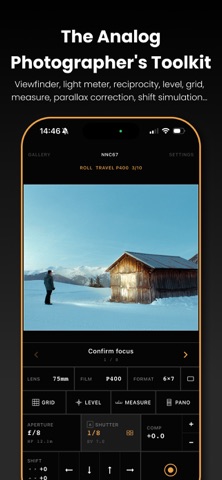
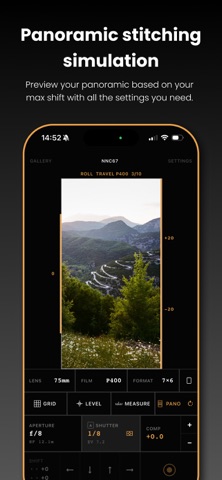
PLEASE READ FIRST Second View is not a camera app and does not take photos for you. It helps you frame, meter, and plan shots before you press the shutter on your own camera. The photos it saves are framing aids, not final images. --- Second View turns your iPhone into a precision field toolkit for analog photographers. Set your lens and format, and it crops the ultra-wide camera to match what your film camera will capture: same field of view, aspect ratio, and framing. Supports 35mm, medium format (6x4.5 through 6x17 panoramic), large format (4x5, 5x7, 8x10), digital sensor sizes, and custom sizes. VIEWFINDER Precise field-of-view matching for any focal length and format. Portrait or landscape, control side of your choice, even upside down. WORKSPACES Design your own bottom control panel. Arrange the controls you use, then switch layouts with an edge-swipe. Start from built-in layouts or build your own per kit. FREEZE MODE Pause the frame on a full-resolution still to compose rise and shift, spot-meter, and measure distance, all without the scene moving. LIGHT METER Select your aperture and the app calculates the shutter speed. EV compensation, hyperfocal distance, auto/manual modes, readout in shutter speed or EV, and whole/half/third-stop increments. BELLOWS COMPENSATION A meter cell folds close-focus light loss into your reading for macro and large-format work, set manually or by LiDAR. SPOT METERING Meter the whole frame, or switch to spot mode to read a small area with a reticle, calibrated against your reference meter. LENS FILTERS Log the ND, polarizer, and color filters on your lens. The meter compensates automatically, and every capture records them. RECIPROCITY CORRECTION 60 built-in film stocks with accurate reciprocity curves, plus your own. Exposures over one second are corrected automatically. Portra, CineStill, Tri-X, Velvia, and more, plus an ECN-2 category. Custom stocks support color or B&W, white balance, and a tunable curve. FILM AND FILTER PREVIEW Simulate B&W film with color filters in the preview and captures, and preview color-film white balance from the loaded stock. LONG EXPOSURE TIMER A countdown timer for long exposures, with a 3-second pre-countdown and a full-screen progress ring. LIDAR DISTANCE MEASUREMENT On iPhone 12 Pro and later, measure the distance to your subject with LiDAR by tapping the viewfinder. On other devices, enter it manually. PARALLAX CORRECTION Compensates for the physical offset between the iPhone and the taking lens, using LiDAR or a manual distance, applied automatically. RISE, FALL AND SHIFT Simulate the movements of a view or technical camera. Offset the crop up, down, left, or right in 1mm steps. COMPOSITION TOOLS Rule of thirds, phi grid, golden triangle, square 1:1, and a custom grid up to 12x12. Bubble level with roll and pitch readout. PANORAMA SIMULATION Preview a stitched multi-frame panorama before you shoot it, and save it as a plan. SHOT CHECKLIST Build a step-by-step checklist per kit and run through it in the viewfinder. One step can fire the shutter automatically when you reach it. CAMERA KITS Save complete configurations and switch instantly. Each kit stores its lenses, format, preferred stocks, workspace, parallax offsets, and checklist. Pick a body and the format picker narrows to the masks it can shoot, with a film-advance guide for multi-format cameras. FILM ROLL TRACKING Track your rolls from first frame to last, so you always know which is loaded and when it was exposed. CAPTURE AND GALLERY Save a reference photo cropped to the exact framing, with full metadata: focal length, format, stock, filters, shutter speed, aperture, ISO, rise/shift, GPS, and timestamp. Optionally export a frame with a data overlay. Edit data, add notes, group into rolls, and export a CSV log. --- Terms of Use : https://www.apple.com/legal/internet-services/itunes/dev/stdeula/ Privacy policy : https://secondview.app/privacy
Latest release
What’s New
- Rotate the live preview 90°, 180°, or 270°. Set it globally or per kit, for cameras and adapters that hand you a turned image. - The rise, fall, and shift arrows now stop at your kit's travel limits. The old "Panorama shift" section is renamed "Max rise, fall, shift", since those values always described both uses. A side left at 0 stays unbounded. - Grid and bubble level stay on across restarts, so your framing setup survives closing the app. - Film list no longer jumps when you star a stock.
Audience growth
Ratings growth
Baseline captured. Growth appears after the crawler observes a changed rating count.
Momentum comes from crawler snapshots for the tracked storefront. “Viral growth signal” means unusually fast recent rating gains; it is an indicator, not download data.
Price tracking
Price intelligence
First snapshot captured. The trend line starts after the next crawler price observation.
- First observed Aug 20, 2026 · 1:28 AM Free
Screenshots