About this app
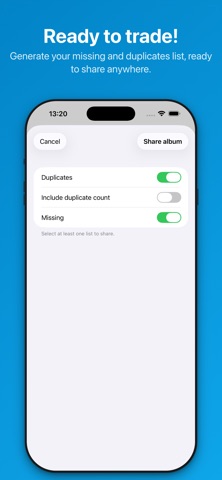
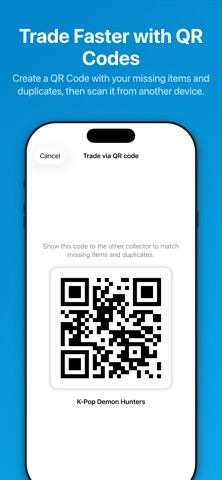
Track sticker and trading card albums in a few taps. With AnyAlbum you always know what is missing, what you have as duplicates, and which trades you can make, without paper notes, messy lists, or carrying every album with you. Built for parents and collectors, AnyAlbum keeps every collection clear, fast to update, and ready to trade wherever you are, even without an internet connection. KEY FEATURES • Missing items and duplicates, always up to date AnyAlbum automatically calculates the status of your collection from the quantities you enter. • Fast entry Update stickers and cards in just a few taps with an interface designed for quick use. • Camera scanner Scan the code on the back of a sticker or card and add it to the album faster. • Ready-to-share lists Create a clear missing-and-duplicates list to copy or send in chats, social groups, and trading communities. • QR Code trading Generate a QR Code with your album's missing items and duplicates. With AnyAlbum PRO, you can also scan another user's QR Code and instantly see what you can trade with each other. • Search and filters Find a specific number right away, or show only missing items or duplicates. • Works offline Core features stay available even when you do not have an internet connection. FREE AND PRO Start for free and manage 1 complete album with the core features, including QR Codes, shareable lists, and the camera scanner. With AnyAlbum PRO, a single one-time purchase with no subscription unlocks: • unlimited albums; • removal of ads; • custom album sections; • downloadable pre-filled albums; • QR Code scanning to check possible trades; • trash bin to recover albums deleted by mistake. Download AnyAlbum and make sticker and card trading simpler.
Latest release
What’s New
QR Code trading is here! You can now generate a QR Code for your album's missing items and duplicates. With AnyAlbum PRO, you can also scan another user's QR Code and instantly check which stickers or cards you can trade with each other. The feature works locally and does not require an internet connection.
Audience growth
Ratings growth
Baseline captured. Growth appears after the crawler observes a changed rating count.
Momentum comes from crawler snapshots for the tracked storefront. “Viral growth signal” means unusually fast recent rating gains; it is an indicator, not download data.
Price tracking
Price intelligence
First snapshot captured. The trend line starts after the next crawler price observation.
- First observed Aug 20, 2026 · 2:24 PM Free
Screenshots