About this app
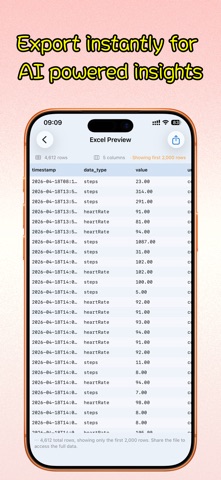
Export your health data, your way. Health APP Data Export helps you read your authorized Apple Health data and export it by date range to CSV, JSON, and Excel. Upgrade to unlock Markdown, PDF, daily summaries, and advanced metrics for sharing, archiving, AI workflows, and trend reviews. Great for: - building a personal health backup - sharing records with doctors, coaches, or researchers - moving health data into spreadsheets, or manually importing files into your preferred AI tools What you can do: - choose 7 days, 30 days, 90 days, or a custom range - export only the metrics you need - export common data like steps, heart rate, sleep, and weight - unlock advanced metrics like HRV, blood oxygen, respiratory rate, and blood pressure - unlock Markdown, PDF, and daily summaries with Pro - manage exports on both iPhone and iPad Privacy first: - no account required - no cloud upload - only reads data you authorize - all processing happens on your device Important: - This app is for exporting, organizing, and reviewing data only. It does not provide medical advice, diagnosis, or treatment. Terms of Use: https://www.apple.com/legal/internet-services/itunes/dev/stdeula/
Latest release
What’s New
More flexible exports with Shortcuts: • Choose a single day or a range using relative dates, such as yesterday or three days ago. Dates are recalculated each run. • Export a specific time window each day, including overnight windows, and combine multiple days into one file. • Select hours and minutes from scrollable lists for easier setup. • View time-window details in export history to check the actual query range. • Improved English and Simplified Chinese localization, health metric search, and setup guidance.
Audience growth
Ratings growth
Baseline captured. Growth appears after the crawler observes a changed rating count.
Momentum comes from crawler snapshots for the tracked storefront. “Viral growth signal” means unusually fast recent rating gains; it is an indicator, not download data.
Price tracking
Price intelligence
First snapshot captured. The trend line starts after the next crawler price observation.
- First observed Sep 11, 2026 · 4:25 PM Free
Screenshots