About this app
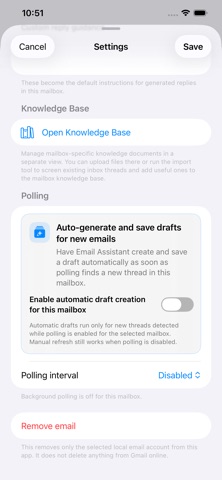
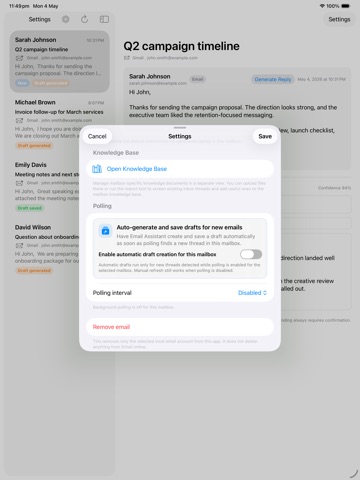
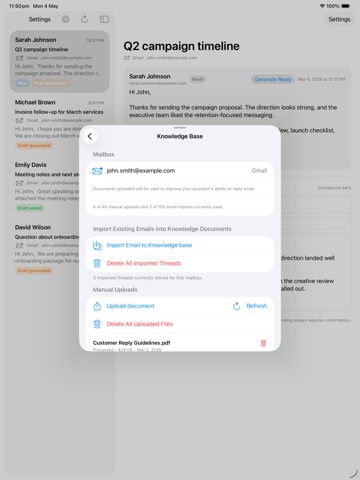
Email Assistant helps you turn Gmail and Outlook conversations into reviewed reply drafts without sending anything automatically. Connect the mailboxes you use, open a thread, and generate a suggested response that is grounded in the selected conversation. You can edit the draft before saving it back into the original Gmail or Outlook thread, so the final message stays in your hands. Build knowledge for each mailbox - Upload documents that describe your business, policies, products, tone, or common answers. - Export useful email threads into a mailbox-specific knowledge base. - Keep knowledge separated by account so personal, customer, sales, and support inboxes do not share the same context. Designed for real email workflows - Connect Gmail and Outlook accounts in one app. - View inbox threads and open the conversation you need. - Generate AI reply suggestions from the current thread and mailbox knowledge. - Save reviewed replies as drafts in Gmail or Outlook. - Manage drafts you choose to send or delete. - Optional automatic draft creation can prepare drafts for new messages when enabled, but Email Assistant still does not send messages for you. Subscriptions unlock mailbox connection, AI drafting, and knowledge-base capacity. Start with a free trial, then choose the account and knowledge limits that match your workflow. Email Assistant is built for people who want faster replies while keeping review, judgment, and final sending under their control. Separate subscription required: AI Reply Essential, AI Reply Pro, and AI Reply Max are auto-renewable subscriptions. Paid AI reply drafting, mailbox connection, draft saving, and knowledge-base features require a separate subscription purchase after any free trial. Privacy Policy: https://ai-lab.com.au/privacy-policy.html Terms of Use (EULA): https://ai-lab.com.au/terms-of-service.html
Latest release
What’s New
Version 1.4 includes performance improvements, reliability fixes, and polish across reply drafting, mailbox setup, and knowledge uploads.
Audience growth
Ratings growth
Baseline captured. Growth appears after the crawler observes a changed rating count.
Momentum comes from crawler snapshots for the tracked storefront. “Viral growth signal” means unusually fast recent rating gains; it is an indicator, not download data.
Price tracking
Price intelligence
First snapshot captured. The trend line starts after the next crawler price observation.
- First observed Aug 7, 2026 · 10:44 PM Free
Screenshots