About this app
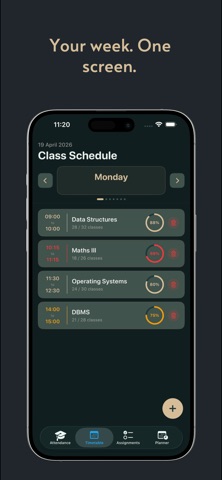
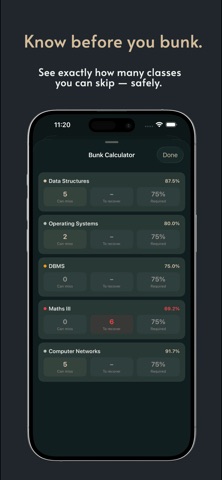
College Buddy answers the one question every student actually asks: can I skip this class? KNOW BEFORE YOU BUNK The "Should I Bunk?" card does the math the moment you open the app. It tells you whether you can miss your next class and still stay above your attendance requirement — and if you've already slipped below it, exactly how many classes you need to attend to climb back. ATTENDANCE IN ONE TAP Add your subjects, set the minimum attendance each one demands, and mark Present or Absent as you go. Every subject shows a live percentage, how many classes you can still afford to miss, and how many you need to recover. MARK IT WITHOUT OPENING THE APP A Live Activity appears on your Lock Screen and in the Dynamic Island around class time, with a live countdown. Tap Present or Absent right there. Your Apple Watch nudges you shortly before each class ends so you can mark it from your wrist. SCAN YOUR TIMETABLE (PRO) Point your camera at your printed timetable, or import a PDF, and College Buddy reads it and builds your entire week in seconds. It all happens on your device — nothing is uploaded. NEVER MISS A CLASS Get a reminder at the start of every class, and an alert the moment a subject drops below the threshold you set. ALSO INCLUDED - Home-screen widgets for at-a-glance attendance - Apple Watch app with complications - Bunk Calculator for planning further ahead - Full attendance history - iCloud sync across your devices - Designed for iPad FREE - Track up to 4 subjects - Should I Bunk card and Bunk Calculator - Lock Screen, Dynamic Island, widgets and Apple Watch - Class reminders and threshold alerts - Attendance history and iCloud sync COLLEGE BUDDY PRO - No ads - Unlimited subjects - Scan your timetable from a photo or PDF - Assignments tracker with deadline reminders - Smart planner with auto-scheduling - Supports an indie student developer Pro is available weekly, per semester, or as a one-time lifetime purchase. Prices are shown in the app in your local currency. Built by a student who kept losing track of his own attendance. Questions or ideas? Get in touch from Settings — I read everything. SUBSCRIPTION TERMS College Buddy Pro is available as a weekly or per-semester auto-renewable subscription, or a one-time Lifetime purchase. Payment is charged to your Apple ID at confirmation. Subscriptions renew automatically unless cancelled at least 24 hours before the end of the current period, and your account is charged for renewal within 24 hours before the period ends. Manage or cancel anytime in your App Store account settings. Terms of Use (EULA): https://www.apple.com/legal/internet-services/itunes/dev/stdeula/ Privacy Policy: https://github.com/RaaghavMehta21/collegebuddy-support/blob/main/privacy.md
Latest release
What’s New
Scan your timetable, then let College Buddy do the rest. TIMETABLE SCANNER (PRO) Point your camera at a printed timetable or import a PDF — College Buddy reads it and builds your whole week in seconds. Everything is processed on your device. LOCK SCREEN & DYNAMIC ISLAND Your current class now appears automatically around class time, with a live countdown. Mark Present or Absent right from the Lock Screen — no unlocking, no opening the app. Tap the card to jump straight to that subject's attendance. APPLE WATCH REMINDERS A reminder arrives on your wrist shortly before each class ends, so you can mark attendance while it's still fresh. FIXES - The Lock Screen card now confirms your tap before it disappears, so you can see that Present or Absent actually registered - Class reminders no longer stop working after the first day - Class alerts survive a missed notification permission on first launch - Planner is quieter and more accurate Thanks for all the feedback — keep it coming.
Audience growth
Ratings growth
Baseline captured. Growth appears after the crawler observes a changed rating count.
Momentum comes from crawler snapshots for the tracked storefront. “Viral growth signal” means unusually fast recent rating gains; it is an indicator, not download data.
Price tracking
Price intelligence
First snapshot captured. The trend line starts after the next crawler price observation.
- First observed Sep 6, 2026 · 12:55 AM Free
Screenshots