About this app
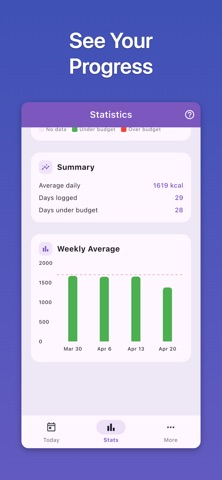
Want to lose weight but calorie counting feels like too much work? Shed Cal makes it easy to stay on track. Just snap a photo of your meal and our AI identifies each food and estimates the calories. FEATURES • AI Meal Scanner Take a photo of your food. Our AI recognizes each item and calculates the calories. Review the results, make any edits, and save to your log. • Manual Food Entry Search our database of common foods. Filter by category like fruits, proteins, grains, or snacks. Tap any food to see calorie info and add it to your log. • Smart Daily Budget Answer a few questions — age, weight, height, activity level — and we calculate your daily calorie budget using the Mifflin-St Jeor equation. Pick how fast you want to lose weight and we adjust accordingly. • Daily Progress See where you stand at a glance. A traffic light progress ring shifts from green to yellow to orange as you approach your budget, turning red if you go over. Entries are grouped by meal: breakfast, lunch, dinner, and snacks. • Meal Reminders Set reminders for breakfast, lunch, or dinner. Gentle notifications help you remember to log your meals. • Streak Tracking Stay motivated with streaks. Every day under your budget counts. See your current streak and your longest streak. • Weekly Charts View your calorie intake over the past four weeks. A simple bar chart helps you spot trends and stay consistent. • Monthly Calendar See your progress by month. Each day shows a color based on how you did against your budget. Tap any date to view or edit your entries. • Backup & Restore Export your data to a file anytime. Restore it on a new device or after reinstalling — your history and streaks come with you. Losing weight comes down to a simple principle: eat less than you burn. Shed Cal does the math, tracks the numbers, and keeps you honest — without a complicated diet plan. There is an optional Premium subscription for unlimited access. The subscription will be charged to your iTunes account upon purchase. Your account will be charged for renewal 24 hours before the current period ends. You can turn off auto-renewal at any time in your Account Settings. Terms of Use: https://www.apple.com/legal/internet-services/itunes/dev/stdeula/ Privacy Policy: https://www.productivetap.com/shed-cal-privacy-policy/
Audience growth
Ratings growth
Baseline captured. Growth appears after the crawler observes a changed rating count.
Momentum comes from crawler snapshots for the tracked storefront. “Viral growth signal” means unusually fast recent rating gains; it is an indicator, not download data.
Price tracking
Price intelligence
First snapshot captured. The trend line starts after the next crawler price observation.
- First observed Aug 18, 2026 · 8:00 PM Free
Screenshots