About this app
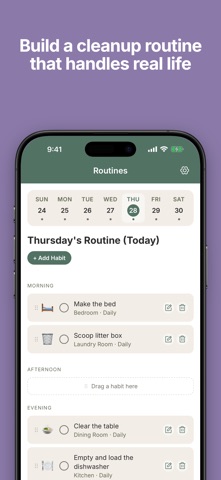
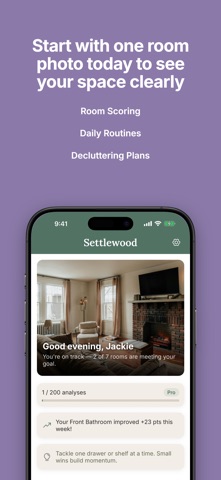
Settlewood turns a single photo of any room into a clear plan to tidy it up. Snap a picture and receive an AI-generated Tidiness Score, a short list of prioritized next steps, and gentle daily habits to help you keep your space looking the way you want. No more standing in the doorway wondering where to start. Just tidy one thing and watch your progress improve from there. WHO IT'S FOR - People who feel overwhelmed by clutter and don't know where to begin - Busy parents whose homes get out of hand because the kids keep bringing more stuff home - Anyone whose brain needs a starting point or checklist, including people with ADHD and other neurodivergent thinkers - People who hesitate to invite friends over, or who shove everything in a closet when company is coming - Anyone trying to build a sustainable cleanup routine instead of panic-cleaning every weekend WHAT YOU GET - AI room analysis: snap a photo, get a Tidiness Score from 0 to 100 - Top Actions: a short, ranked list of what to tackle first, tagged High, Medium, or Low impact - Zone-by-zone insights: see exactly which surfaces, corners, or shelves need attention, with practical suggestions for each - Daily habits: small, room-specific routines you can add with a tap to keep your space maintained - Progress tracking: see your starting and ending scores for each room, day by day - Insights view: spot your tidiest areas and your hot spots across the whole home - Built-in privacy: faces in your photos are automatically blurred before AI analysis. Your photos are never shared, never used to train AI models, and you can delete them at any time. HOW IT WORKS 1. Pick a room and snap a photo 2. Get your Tidiness Score and a short, prioritized action list in seconds 3. Tackle a few items, snap another photo, watch your score go up 4. Add suggested habits to your morning, afternoon, or evening routine 5. Come back tomorrow and see how the room held up overnight PRIVACY FIRST Your photos belong to you. We blur detected faces before any AI processing, encrypt your data in transit and at rest, and never share or sell your information. You can delete a photo or your entire account at any time, which permanently removes all of your data. SUBSCRIPTION DETAILS Payment will be charged to your Apple ID account at confirmation of purchase. Subscriptions automatically renew unless auto-renew is turned off at least 24 hours before the end of the current period. Your account will be charged for renewal within 24 hours prior to the end of the current period at the rate of your selected plan. You can manage and cancel your subscription in your Apple ID account settings after purchase. Any unused portion of a free trial is forfeited when you purchase a subscription. Privacy Policy: https://settlewood.app/privacy Terms of Service: https://settlewood.app/terms Questions or feedback? Visit https://settlewood.app/support
Latest release
What’s New
New in this update: - Fixed a bug that was making some users sign in again and again. We read every message. If you spot an issue or have a great idea for Settlewood, tap Send Feedback in Settings and let us know. Thanks for helping make Settlewood better.
Audience growth
Ratings growth
Baseline captured. Growth appears after the crawler observes a changed rating count.
Momentum comes from crawler snapshots for the tracked storefront. “Viral growth signal” means unusually fast recent rating gains; it is an indicator, not download data.
Price tracking
Price intelligence
First snapshot captured. The trend line starts after the next crawler price observation.
- First observed Aug 15, 2026 · 1:39 AM Free
Screenshots