About this app
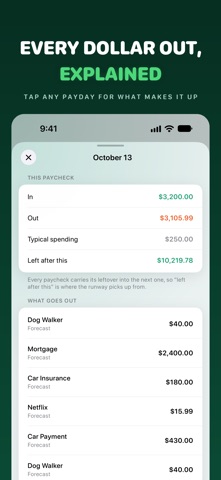
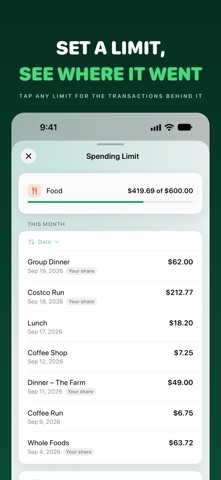
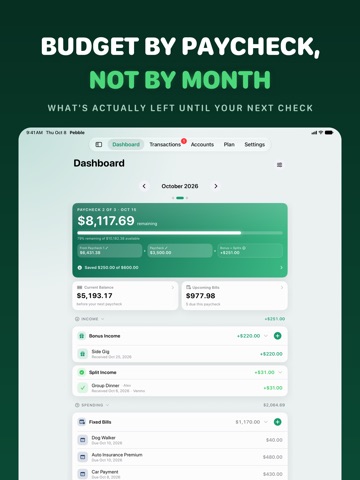
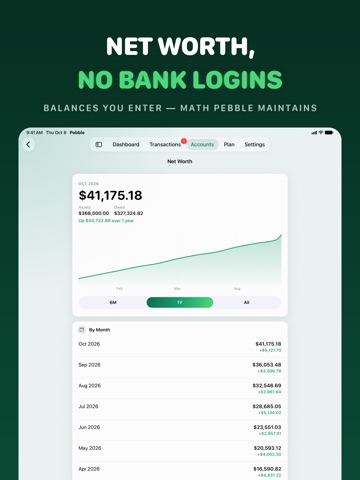
Pebble - Budget by Paycheck Most budgeting apps think in months. Your money doesn't. Pebble budgets the way you actually get paid — paycheck by paycheck — so you always know what's safe to spend before the next one lands. Set your pay schedule once (semi-monthly, biweekly, or weekly) and Pebble pages every month into its real paychecks. Each paycheck gets its own dashboard with a clear "Remaining" number after bills, card payments, and everyday spending settle. See where you're heading. Pebble projects your paychecks forward and shows where each month ends up — what lands, what goes out, and what's left when it does. It tells you your tightest point and warns you when you'd run short, and it counts your everyday spending, not just your bills, so the months ahead aren't quietly optimistic. Track a loan the way your lender does. Enter what you owe today and Pebble projects the payoff forward from there, tells you which month makes the last payment, and stops charging it after that. Planning to pay extra? Add a one-off or monthly extra principal payment and Pebble shows how many months sooner the loan ends and how much interest you keep. Moving money to savings? Record the transfer and Pebble counts it as saving, not spending — with a Savings home that tracks your balance month by month, and a linked savings account (Pro) that updates as your moves land. Set a monthly limit on any category and Pebble shows what you've spent against it — with the transactions behind every figure — and Pebble Pro draws your net worth month by month, so you can see exactly what moved it. PLAN EVERY PAYCHECK • A paycheck dashboard with a live Remaining hero card • Upcoming bills for the selected paycheck, sorted by date • Reorderable cards so the layout matches how you think • Variable paycheck amounts, bonus income, and start-balance overrides TRANSACTIONS, YOUR WAY • A clean ledger with search, category, and card filters • Browse any month with the new month switcher • Multi-select bulk edit: move to paycheck, move to card, or delete • Per-expense paycheck assignment with smart defaults CREDIT + DEBIT CARDS • Charges attribute to the paycheck that will actually pay the statement • Carry-in / carry-out badges show what's settling this cycle vs next • Track balances and log payments; debit cards settle instantly SPLIT EXPENSES • Split any expense across as many people as you need • Request via Venmo, Zelle, Cash App, or cash and track who has paid • Received shares flow back in as income on the right paycheck ACCOUNTS & NET WORTH (Pro) • Manual-balance accounts for assets and liabilities • A net-worth roll-up: assets − liabilities − card debt • Per-account and per-card "include in net worth" toggles • Always your numbers — Pebble never fetches or guesses balances RECURRING & REMINDERS • Set a bill once; it materializes each cycle on its due date • Recurring income templates for predictable extra money • Optional local reminders a few days before each bill is due • Subscription health view with monthly + yearly totals EVERYWHERE YOU ARE • iPhone and iPad, with an adaptive layout • Apple Watch app — glance, bills due, quick-add, and complications (free) • Home and Lock Screen widgets for Remaining, next bill, and splits • Private iCloud sync across your devices, plus daily iCloud Drive backups PRIVACY FIRST Your data lives in your own private iCloud. No account to create, no ads, no third-party trackers, no bank connections. Pebble never sees your finances. PEBBLE PRO — ONE-TIME PURCHASE The free tier covers everyday paycheck budgeting. Pebble Pro is a single $9.99 purchase (no subscription) that unlocks: • Unlimited cards, recurring templates, and split participants • Accounts and net-worth tracking • Full history and year recap • Unlimited future-month planning • CSV and PDF export Budget the way you get paid. Download Pebble and take control of every paycheck.
Latest release
What’s New
Pebble is ready for iPhone Duo, and it keeps your place on every screen size. • Made for iPhone Duo. Pebble fills both displays: a tab rail along the edge when it's folded, a sidebar when it's open. Fold, unfold or move into Split View in the middle of something and nothing is lost. An open form, what you'd typed into it, the screen you were on and your selection all stay exactly where they were. • A new look on iPad. Pebble uses the system's adaptive tab bar: a sidebar in landscape, and in portrait a floating tab bar at the top whose button opens the sidebar. Rotating, resizing a window or turning a large iPhone sideways no longer sends you back to the top. And on iPhone in landscape, the title, month and paycheck dots now share one slim row, so there's about twice the room to scroll. • Touch ID, by name. On iPhone Duo and iPads with Touch ID, Settings → Security now says Touch ID / Passcode Lock, with the right icon, and the lock screen stays clear of the Touch ID prompt on shorter screens and in landscape. Fixed: long-pressing a transaction, limit or account on iPad, or on a large iPhone turned sideways, now lifts that row instead of an empty bar. On iPad and Mac, screens you open from a tab keep the same comfortable width as the tabs, and Settings names your iPad or Mac instead of calling it an iPhone. Questions or feedback? Reach us at clmsstudio.com/apps/pebble/support.
Audience growth
Ratings growth
Baseline captured. Growth appears after the crawler observes a changed rating count.
Momentum comes from crawler snapshots for the tracked storefront. “Viral growth signal” means unusually fast recent rating gains; it is an indicator, not download data.
Price tracking
Price intelligence
- First observed Aug 23, 2026 · 6:09 AM Free
Screenshots