About this app
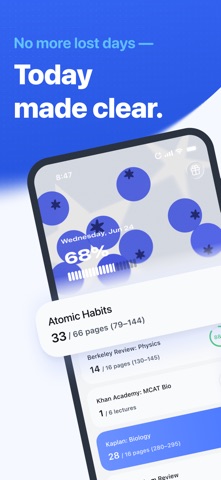
Todait is a study planner for big exams and long courses. Add what you need to finish, set your deadline, and get one realistic study portion for today. When you miss a day, Todait recalculates the rest of your plan so you can keep going without starting over. Big exams aren't won in a panic. They're won in quiet, steady days. HOW IT WORKS Tell Todait what you need to learn and by when. It counts backward from your exam date, weighs what's left, and gives you today's portion — not a guess, real arithmetic. And when a day slips away — and some days will — Todait rebalances the rest. No restart screens. No catch-up guilt. Just today's revised plan, ready when you open the app. WHAT TODAIT DOES — Spreads your full prep evenly across the days you have left — Sets daily portions from real pages, lectures, sections, or practice sets — Rebalances automatically when you miss a day — Shows progress by chapter, by week, by deadline — Runs multiple plans for multiple subjects at once — Keeps separate flows for reading, watching, practicing, and assignments A REAL 24 DAYS WITH TODAIT Day 1 — You enter "MCAT Biology review book, 320 pages, finish in 24 days." Todait answers: 14 pages today. You do them. Day 8 — A long shift, a hard day. You read nothing. No guilt — Todait quietly works the miss back into the days ahead. Day 9 — You open the app. It says 16 pages: yesterday spread across the days left, not dumped onto tomorrow. Still doable. You keep going. Day 24 — The book is done. Every page is behind you. You didn't cram, you didn't burn out — you arrived steady, one calm portion at a time. WHY TODAIT Most study apps hand you an empty checklist and leave the hardest part to you. Todait carries it — the arithmetic, the rescheduling, the constant "am I on track?" — so all you carry is today. A big exam doesn't have to feel big. The right plan makes today lighter. Open Todait, and see today's number. Today, toward your dream. Terms of Use (EULA): https://www.apple.com/legal/internet-services/itunes/dev/stdeula/ Privacy Policy: https://todait.com/privacy/ Terms of Service: https://todait.com/terms/
Latest release
What’s New
- Today now clearly shows when your study plans have been automatically adjusted. - A new banner at the top of Today lets you know how many plans were adjusted. - Adjusted plan cards now show the previous and updated amount, such as “was 8 pages -> 5 pages.” - When you return after being away for a few days, TodayCover now explains that your plans have already been adjusted. - “See what’s been adjusted” takes you directly to the adjusted plans on Today. - Improved Today layout so adjustment banners and plan cards stay in the expected position across larger iPhone screens. - Fixed cases where TodayCover could be marked as seen before it was actually shown.
Audience growth
Ratings growth
Baseline captured. Growth appears after the crawler observes a changed rating count.
Momentum comes from crawler snapshots for the tracked storefront. “Viral growth signal” means unusually fast recent rating gains; it is an indicator, not download data.
Price tracking
Price intelligence
First snapshot captured. The trend line starts after the next crawler price observation.
- First observed Aug 23, 2026 · 6:09 AM Free
Screenshots