About this app
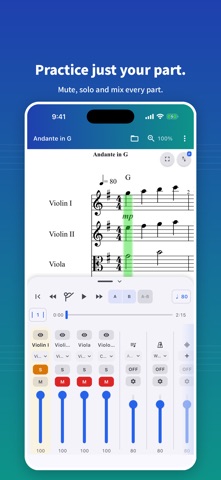
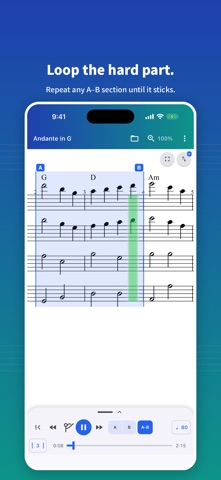
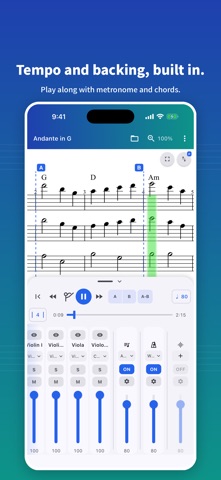
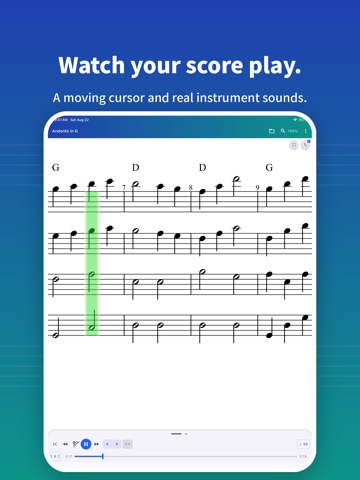
Scorelio is a simple sheet-music viewer that lets you read, listen to, and practice your scores from a single phone. Load a file, hit play, and follow the cursor as it moves across the staves. ■ Supported file formats - MusicXML (.xml / .musicxml / .mxl) - Standard MIDI File (.mid / .midi) - MuseScore (.mscz) - Finale (.musx) ■ Key features - Score rendering with orchestral playback - Cursor that follows the music in real time - Choose how the score moves: turn pages, or hold the playback position centred or left of centre - Solfège syllables (movable do) under the notes, taken from the key signature and following changes of key - Tap anywhere on the score to move the playhead there - Per-part mute and solo - Per-part volume and instrument (sound) selection - Hide a part's staff to read only your own line (hidden parts keep playing) - A-B repeat with beat-snapped in/out markers - Raise the tempo each lap of an A-B repeat (step, ceiling, laps per speed) - Tempo control (50-300 BPM) - Count-in: one bar is counted before playback starts - Metronome with selectable click sounds and downbeat/offbeat options - Chord track: automatic backing that follows the chord symbols in the score, with selectable voicings - Audio track: play your own backing or reference recording in sync with the score — it follows even when you change the tempo - Jump to any measure or section - Recent scores on the home screen — pick up where you left off - Full-screen paper layout - Pinch-to-zoom, double-tap to fit, single-line horizontal scroll - Control from an external keyboard or a page-turner pedal (play and pause, step a measure, turn a page, A-B repeat) - Screen reader support (VoiceOver) ■ Designed for practice - Solo your own part to focus on it - Mute your part and play along with the rest of the ensemble - Switch instrument sounds to make a part easier to follow - Loop a tricky section with A-B repeat until you nail it - Start slow and let each lap raise the tempo until you are up to speed - Read your own staff large while the rest of the ensemble keeps playing - Check rhythm and harmony against the metronome and chord backing - Import a backing track or reference recording and practice along with it - Sight-read a new score with the solfège syllables to hear how the notes relate ■ Scorelio Pro (one-time purchase) A single purchase unlocks everything below and restores on your other devices with the same account: - Remove ads - An additional sound font - Add your own sound fonts (.sf2 / .sf3) and play with them - Export scores and performances (MusicXML / MIDI / PDF / audio .m4a / video .mp4) - Transpose by semitone - Notation and reference pitch: show transposing parts as written or as they sound, and tune to A=442 or another reference ■ Privacy-friendly by design - The contents and names of the scores you open are processed only on your device and never uploaded - Playback works without an internet connection - No name, email, or account sign-in required - An advertising ID is collected for ad delivery, and anonymous usage and crash data for quality improvement (see the privacy policy) ■ Languages English / German / Japanese / Simplified Chinese / Traditional Chinese / Korean / Vietnamese Whether you sing in a choir, play in a wind ensemble, rehearse in a band, or prepare for your next lesson, Scorelio fits in your pocket.
Latest release
What’s New
■ What's New - Control playback from an external keyboard, or a page-turner pedal that connects as one: space plays and pauses, the left and right arrows step a measure, up and down turn a page, A and B set the loop points, and L switches the A–B loop on and off. - Compressed MusicXML files (.mxl) now open directly. ■ Improvements - The app uses much less memory. ■ Bug Fixes - Fixed arpeggio marks missing on MuseScore scores.
Audience growth
Ratings growth
Baseline captured. Growth appears after the crawler observes a changed rating count.
Momentum comes from crawler snapshots for the tracked storefront. “Viral growth signal” means unusually fast recent rating gains; it is an indicator, not download data.
Price tracking
Price intelligence
First snapshot captured. The trend line starts after the next crawler price observation.
- First observed Sep 18, 2026 · 2:42 AM Free
Screenshots