About this app
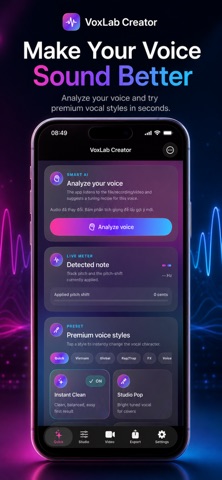
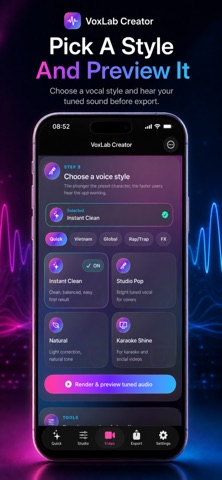
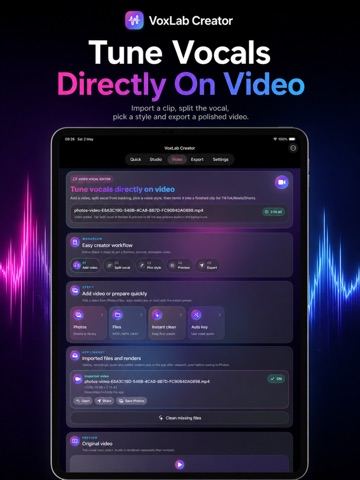
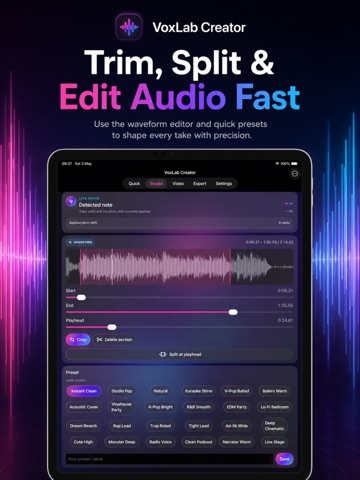
Turn raw recordings into polished vocal clips with VoxLab Creator — a vocal tuning, audio editing and video remix studio built for singers, rappers, podcasters, karaoke creators and short-form video makers. Record your voice, import audio, add video, analyze your vocal tone, choose a style, preview the result, refine the sound and export a finished clip. Whether you want a clean natural voice, a pop vocal, a rap lead, a karaoke shine, a podcast voice or a hard-tuned effect, VoxLab Creator helps you shape your sound faster. Make vocals sound better in minutes VoxLab Creator is designed to help you: Record voice directly in the app Import audio or video from Photos and Files Tune vocals with pitch correction controls Preserve voice color with formant tools Reduce noise with gate, compressor and limiter controls Compare raw and tuned audio Edit waveform sections with trim, crop, split and delete tools Export audio files and finished videos Smart Vocal Analysis Every voice is different. VoxLab Creator can analyze your vocal range, tone, pitch behavior, dynamics and noise level, then suggest a tuning recipe that fits your voice. Use the suggestion as a starting point, or fine-tune manually until the vocal feels right. Voice styles for every creator Try premium vocal styles made for different use cases: Instant Clean Studio Pop Natural Karaoke Shine V-Pop Ballad Bolero Warm Acoustic Cover Rap Lead Trap Robot R&B Smooth Lo-Fi Bedroom Radio Voice Clean Podcast Narrator Warm Live Stage Each style changes the vocal character so you can quickly find a sound that fits your song, cover, rap, voice-over or video. Tune vocals directly on video Import a video, split the vocal from the backing, tune the vocal, rebalance the mix and render a finished video. VoxLab Creator is made for creators who want to keep the original visual, improve the sound and export a polished clip for sharing. Refine after export Not perfect yet? Keep improving. After rendering, you can apply smart fixes based on what you hear: Vocal too low Music too loud Too bright or harsh Too dark Tune too obvious More hard-tune Too dry Too much reverb Vocal too thin Noise or breaths Create new versions and keep your edit history inside the app. Built for privacy VoxLab Creator is designed to process your audio and video locally on your device. Your imported files, recordings, edited audio and rendered videos stay in the app library unless you choose to save or share them. The app requests access only when needed: Microphone: to record audio Photos: to import videos and save finished renders Files: to import or export media files VoxLab Creator Pro Upgrade to VoxLab Creator Pro to unlock premium creator tools, including advanced voice styles, smart analysis actions, enhanced vocal split options, tuned video preview, export, sharing and saving features. Available plans: Weekly Pro Monthly Pro Yearly Pro Lifetime Unlock Weekly, Monthly and Yearly plans are auto-renewable subscriptions. Lifetime Unlock is a one-time purchase. Subscription payment will be charged to your Apple ID at confirmation of purchase. Subscriptions automatically renew unless canceled at least 24 hours before the end of the current period. You can manage or cancel your subscription in your App Store account settings. Privacy-Policy: https://voxlabcreator.shop/privacy-policy Term of Use: https://www.apple.com/legal/internet-services/itunes/dev/stdeula/ Support: https://voxlabcreator.shop/support Important notes VoxLab Creator is an audio and video editing tool. Results may vary depending on the original recording, microphone quality, background noise, music level and vocal clarity. Please only edit, export and share content that you own or have permission to use.
Latest release
What’s New
Split. Tune. Merge. Smoother than ever. VoxLab now lets you cut your recording into smaller sections, edit each part separately, and combine everything into one polished final track. Fine-tune specific vocal parts, apply effects only where needed, fix mistakes faster, and create smoother voice and video edits for singing, rap, karaoke, podcasts, and videos. This update also includes major performance optimizations across the app, making editing, playback, preview, and export smoother, faster, and more stable.
Audience growth
Ratings growth
Baseline captured. Growth appears after the crawler observes a changed rating count.
Momentum comes from crawler snapshots for the tracked storefront. “Viral growth signal” means unusually fast recent rating gains; it is an indicator, not download data.
Price tracking
Price intelligence
First snapshot captured. The trend line starts after the next crawler price observation.
- First observed Aug 15, 2026 · 8:33 PM Free
Screenshots