About this app
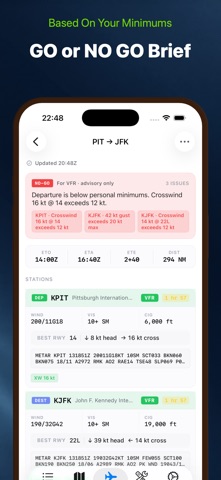
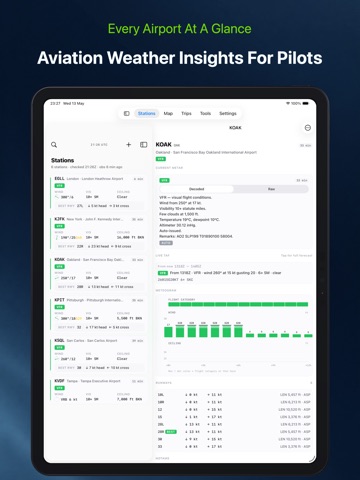
SkyFeed is an aviation weather app for general aviation pilots: student, private, and IFR-rated. It decodes METAR and TAF into plain English by default, checks your personal minimums, and returns one clear preflight verdict: GO, NO-GO, or CHECK. Built for pilots flying Cessna, Piper, Cirrus, Diamond, and Mooney class singles. Calm and quiet, on the ground and in the cockpit. DECODED BY DEFAULT Every METAR and TAF surfaces a plain-English sentence above the raw text. Tap to expand the coded report. Decoded is the default, because that is how pilots actually read weather under time pressure. ONE VERDICT, NOT A WALL OF DATA Open a saved trip and SkyFeed renders a Pre-Flight Brief: GO, NO-GO, or CHECK with a one-sentence reason • Per-airport breakdown for departure, destination, alternate • Personal-minimums grid with every limit as pass or fail • Distance, ETE, and ETA at your cruise speed The engine checks visibility, ceiling, max wind, crosswind, tailwind, and density altitude against your active profile. It demotes to CHECK on stale data, flags thunderstorms, and warns on IFR trips without an alternate. PERSONAL MINIMUMS, FIRST-CLASS Keep multiple profiles and switch in one tap: • VFR Day • VFR Night • IFR Solo • IFR with Passengers • Training Every screen evaluates against the active profile. WATCHED AIRPORTS Each row shows: • ICAO and IATA codes • Flight category (VFR, MVFR, IFR, LIFR) • Wind in knots, visibility in statute miles, ceiling in feet • Observation age and NOTAM count • Best runway for current wind Group by Home Base, region, or training. Small fields borrow from the nearest reporting station. STATION DETAIL • Decoded METAR with raw text on tap • Live TAF preview • 12-hour meteogram: flight category, wind, gusts, ceiling • Runway diagram with headwind and crosswind components • NOTAMs grouped by impact • Tower, ground, and ATIS frequencies • PIREPs within 50 nautical miles LIVE TAF READER Chronological list with FM, BECMG, TEMPO, PROB30, PROB40 cards. Times in Zulu. MAP • Worldwide animated radar (RainViewer) with a time scrubber • US high-resolution NEXRAD as an optional layer • Satellite infrared • SIGMET and AIRMET polygons • PIREPs as severity-tagged icons • Markers color-coded by flight category TRIPS Save routes with departure, destination, alternate, ETD, tail number, cruise altitude, cruise speed. Filter by Upcoming, Today, This Week, Past. AVIATION CALCULATORS • Density altitude • Pressure altitude • Wind components • Crosswind table • True airspeed and Mach • Unit converter • Sun and civil twilight times • Weight-and-balance scaffold ALERTS Rule-based notifications watch your stations in the background. Category drops, wind exceeds, visibility or ceiling falls. Quiet hours and SPECI bypass. WIDGETS Home Screen widgets in two sizes: one airport, or four side-by-side. BUILT FOR iPAD Real master-detail layouts. List on the left, full station detail on the right. Three-column reading order on Station Detail and Pre-Flight Brief. OFFLINE-FIRST Every screen renders from local cache when offline. Stale-data badges escalate at one hour and four hours, with flight-category color suppressed so you never decide on expired data. UNITS ICAO codes, Zulu time, knots, statute miles, feet, inches of mercury, Celsius. Toggle to Local time or metric. PRIVACY No accounts. No server-side data. No analytics. No ads. No telemetry. All persistence is local. WHAT SKYFEED IS NOT SkyFeed is not a navigation app. No flight-plan filing, charts, approach plates, or sectionals. Not a substitute for an official preflight briefing. In the US: NOAA aviationweather.gov and 1800wxbrief. In Europe: AIS, Eurocontrol, and your national met service. Advisory only. AT LAUNCH FAA NOTAM integration is pending approval. International NOTAMs are not in v1. Single alternate per trip. iPhone and iPad only. iOS 18 or newer required.
Latest release
What’s New
Bug fixes and stability improvements, plus support for more languages: German, French, Italian, Spanish, and Dutch.
Audience growth
Ratings growth
Baseline captured. Growth appears after the crawler observes a changed rating count.
Momentum comes from crawler snapshots for the tracked storefront. “Viral growth signal” means unusually fast recent rating gains; it is an indicator, not download data.
Price tracking
Price intelligence
First snapshot captured. The trend line starts after the next crawler price observation.
- First observed Aug 21, 2026 · 5:59 AM Free
Screenshots