About this app
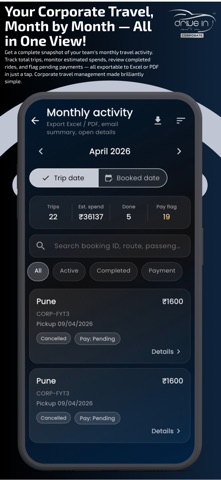
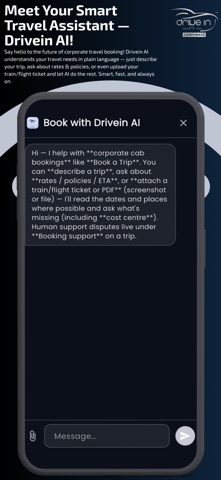
Drivein Corporate is the mobile companion for corporate ground transportation. Sign in with your corporate account, then plan trips, track bookings, and stay aligned with your organization’s approval and billing workflows. Book the way your company works Choose your city and trip type, pick from local hour/kilometer packages or intercity options, and browse vehicles with corporate rate cards and duty types configured for your account. Use places search to set pickup and destinations accurately. Stay on top of every ride Review My Bookings, open trip details, and handle follow-ups such as driver and vehicle information, ratings, and payment and billing when your trip allows it. Corporate controls Use Approvals where your program requires manager or admin sign-off before travel moves forward. Help when you need it Reach Support from the app. You can share your location when reporting an issue and attach photos from your library or camera so the team can assist faster. Smarter booking (where enabled) Linked corporate users can use the booking assistant for quicker, guided booking from key screens. Built for reliability The app is designed for real-world travel: sign-in, cloud sync, notifications where enabled, and a focused Home, Bookings, Approvals, Support, and Profile layout so everyday tasks stay one tap away.
Latest release
What’s New
What's new in 1.0.7 • Faster app launch — splash opens quicker with no forced wait • Booking tabs now match your company settings (no extra Airport tab flash) • Upload and update your profile photo from Profile • Support chat: images and documents now send and display correctly • Clearer payment option for Pay After Invoice • More accurate Local package fares when using manual addresses • Modify My Bookings Improved • Improvements in UI/UX • Refine the Support Chat • Fix Airport Pickup & Drop Auto-Selection • Bug fixes and stability improvements
Audience growth
Ratings growth
Baseline captured. Growth appears after the crawler observes a changed rating count.
Momentum comes from crawler snapshots for the tracked storefront. “Viral growth signal” means unusually fast recent rating gains; it is an indicator, not download data.
Price tracking
Price intelligence
First snapshot captured. The trend line starts after the next crawler price observation.
- First observed Aug 21, 2026 · 1:52 AM Free
Screenshots