About this app
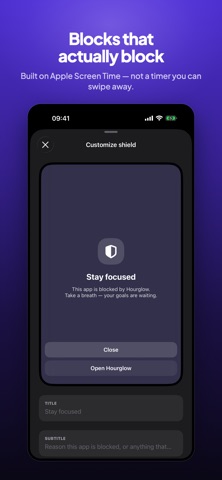
Reclaim your time. Hourglow blocks the apps and websites that pull you in, so you can focus on what actually matters. Social media at work. Games before bed. Endless scrolling when you should be studying. Hourglow puts you back in control with a single tap. BLOCK DISTRACTIONS INSTANTLY Pick the apps, websites, or whole categories you want a break from, set a timer, and go. 15 minutes or 4 hours, focus starts now. SET IT AND FORGET IT Create recurring schedules that block automatically: work hours, study sessions, bedtime, the gym. Your focus runs on autopilot, every day. BLOCK BY PLACE Trigger blocks the moment you arrive somewhere. Walk into the office or the library and the distractions switch off by themselves. DAILY LIMITS Give yourself a budget. When you hit your daily minutes on an app, Hourglow steps in. STRICT MODE For the moments you would talk yourself out of it. Lock your blocks behind a PIN, a confirmation phrase, and a cool-down delay, so the spur-of-the-moment urge can't win. KEEP WHAT MATTERS WORKING Add an allowlist for the apps that should never be blocked, like phone, maps, messages, and accessibility tools. MAKE IT YOURS Replace the block screen with your own title and motivational message. A reminder of your goals every time you reach for a distraction. SEE YOUR PROGRESS Track the time you've reclaimed with clean weekly stats and insights. Watch your screen time drop. PRIVATE BY DESIGN Hourglow is built on Apple's Screen Time technology. Your data stays on your device. No accounts, no tracking, no sharing. Ever. HOURGLOW PREMIUM Unlock the full experience: - Unlimited apps and categories - Recurring and location-based schedules - Daily usage limits - Strict Mode - Detailed insights - Custom shield messages Try Premium free for 3 days. Cancel anytime. Start with a single block. Reclaim hours. Hourglow offers auto-renewing subscriptions: Annual (with a 3-day free trial) and Weekly. Prices are shown in the app. Payment is charged to your Apple ID at confirmation of purchase. Subscriptions renew automatically unless auto-renew is turned off at least 24 hours before the end of the current period. Manage or cancel anytime in your App Store account settings. Any unused portion of a free trial is forfeited when you buy a subscription. Terms of Use: https://appfusionutilities.com/focusGuard/terms_of_use.html Privacy Policy: https://appfusionutilities.com/focusGuard/privacy_policy.html
Latest release
What’s New
Setup got a complete rebuild. • A guided walkthrough now takes you from install to your first block in about a minute — choose your apps, pick a length, and see a real block running before you're done. • You land in the app already set up, instead of on an empty screen. • Calmer, smoother transitions the whole way through. Fixed: declining the Screen Time prompt used to leave you stuck on that step with no explanation. You can now retry it, jump straight to Settings, or carry on without it.
Audience growth
Ratings growth
Baseline captured. Growth appears after the crawler observes a changed rating count.
Momentum comes from crawler snapshots for the tracked storefront. “Viral growth signal” means unusually fast recent rating gains; it is an indicator, not download data.
Price tracking
Price intelligence
First snapshot captured. The trend line starts after the next crawler price observation.
- First observed Oct 12, 2026 · 7:49 PM Free
Screenshots