About this app
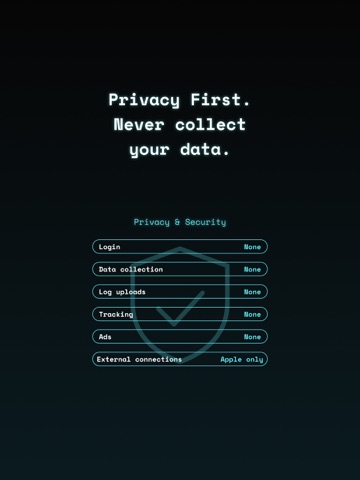
Copy & Paste, Faster. copipi is a copy and paste app for iOS (iPhone / iPad). Save the words and phrases you use often, then copy them with one tap. iOS Text Replacement cannot save text with line breaks. copipi can. Put your text into folders and find it quickly. Add copipi to your keyboard, and you can paste your text without opening the app. Simple and easy to use, for everyone. USE CASES • Message templates • Prompts for generative AI • Addresses and email addresses • Social media posts, replies, and hashtags • Marketplace listings and replies • Work messages, sales messages, and reports • Customer support and inquiries FEATURES • Keyboard Extension (Recommended) Use copipi from your keyboard. You can paste text without leaving the app you are in. To turn this on, add the copipi keyboard in the Settings app. • Copy Tap once to copy your saved text. • Data Management (Add, Edit, Delete, Duplicate, Reorder, Favorites, Search) Save the text you copy often. A title makes an entry easy to find. Favorite entries are highlighted. • Folder Management (Add, Edit, Delete, Duplicate, Reorder, Favorites) Use emoji folders to organize your text. A folder name makes a folder easy to find. If you have one or more favorite entries, the Favorites folder appears at the top. • Custom Settings (Text Size, Theme Color, Copy Haptics) Change the text size with a slider. Change the theme color to change the main color and the app icon. Copy haptics follow the haptics setting on your device. If that setting is off, copipi cannot vibrate. • Share (Add Directly from Other Apps) Add text from other apps, such as Safari or Notes, with the iOS Share Sheet. • iCloud Sync Turn on iCloud to sync and back up your data across your devices. • Backup & Restore (Export, Import) Save your data as a JSON file. Use it to restore your data or move it to another device. • Reset (Delete All Data) Delete all of your folders and entries at once. • Placeholders (Input Replacement, Automatic Date Insertion) Some parts of your text change every time. A placeholder lets you fill in only those parts when you copy. Add {{variable_name}} to your text. When you copy, copipi asks you for a value. Variables with the same name get the same value. A date placeholder adds today's date. You can choose the date format. To add a placeholder, tap the icon at the bottom right of the text field. Note: {{variable_name}} does not work in the keyboard extension. Date placeholders do work. • Integrations (Widgets, Control Center, Spotlight, Siri, Shortcuts) Reach your text quickly without opening the app. Note: iOS does not let apps watch the clipboard in the background, so copipi cannot save your copy history automatically. To save text, add it in copipi or with the Share menu. ACCESSIBILITY We want copipi to be easy for everyone. For bugs or suggestions, contact us from Settings. • VoiceOver — supported • Voice Control — you can use the buttons by voice • Larger Text — follows the text size setting on your device • Dark Mode Only — the screen is always dark • No color-only cues — every state is also shown without color • Good contrast — text stays easy to read • Reduce Motion — animations become shorter when this is on • Haptic feedback — you can turn copy vibration on or off copipi Pro You can save up to 20 entries. copipi Pro removes this limit. Family Sharing is supported. PRIVACY & SECURITY • We collect nothing — not your copied text, not analytics, not usage data • copipi does not send anything to other companies. It uses only Apple services (iCloud and the App Store) • Your data stays on your device, and iCloud keeps a safe backup • copipi works offline. Only iCloud sync and subscriptions need the internet Note: The App Store privacy label for copipi says "Data Not Collected — The developer does not collect any data from this app." Apple checks this during review. Terms of Use (EULA): https://gu-c.com/copipi/terms
Latest release
What’s New
Added Reset to Settings. You can now delete all of your folders and entries at once.
Audience growth
Ratings growth
Baseline captured. Growth appears after the crawler observes a changed rating count.
Momentum comes from crawler snapshots for the tracked storefront. “Viral growth signal” means unusually fast recent rating gains; it is an indicator, not download data.
Price tracking
Price intelligence
First snapshot captured. The trend line starts after the next crawler price observation.
- First observed Sep 4, 2026 · 1:19 PM Free
Screenshots