About this app
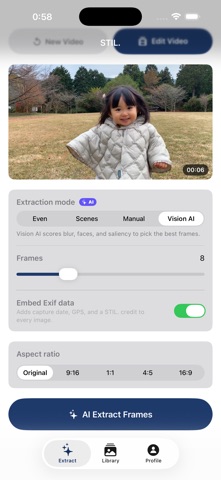
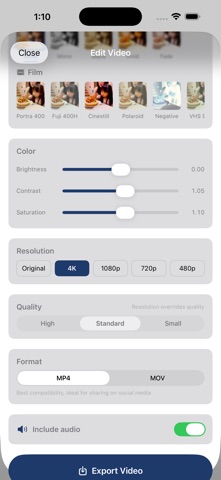
The best shot was in your video all along. STIL. extracts still frames from your videos and finishes them like photographs — with film looks, color grading, and AI enhancement. Everything runs inside this iPhone. Your videos and photos never leave the device, and no account is required. ■ Frame Extraction Scrub through any video and pull out the perfect moment. Vision AI scores blur, faces, and composition to pick the best frame automatically — avoiding closed-eye shots. Choose an extraction style for portraits, action, landscapes, and more. ■ Film Looks Recreate the look of Kodak, Fujifilm, Ilford, and more. Adjust grain, vignette, contrast, and color tone to give every frame its own character. ■ AI Enhancement Face-aware skin refinement, face focus, super-resolution upscaling, and automatic AI color grading — turning a video frame into a photo worth keeping. Every AI feature is free, with no usage limits. ■ What STIL. Pro Unlocks · Export without watermark · iCloud library sync · Unlimited custom presets · 4K high-resolution export · Pro film looks (expanded selection) · Exif data embedding (date, GPS) Shoot video. Keep the best frame. — Terms of Use (EULA): https://www.apple.com/legal/internet-services/itunes/dev/stdeula/ Privacy Policy: https://stil.photo/privacy
Latest release
What’s New
■ Rotate and straighten in Crop A ±15° tilt slider for fine adjustments and a 90° rotate button. The crop frame automatically fits inside the rotated image, so the result never includes black corners. ■ Sharper AI frame extraction Each preset now uses its own scoring formula. Portrait excludes frames without a person, and selection is distributed evenly across the video timeline — switching styles now produces noticeably different picks. ■ Refined AI enhancement Straighten direction has been corrected. Portrait blur sharpens the edge around people, and skin smoothing keeps the eyes and lips precisely intact. Adjusting a slider after applying cleanly replaces the previous result instead of stacking.
Audience growth
Ratings growth
Baseline captured. Growth appears after the crawler observes a changed rating count.
Momentum comes from crawler snapshots for the tracked storefront. “Viral growth signal” means unusually fast recent rating gains; it is an indicator, not download data.
Price tracking
Price intelligence
First snapshot captured. The trend line starts after the next crawler price observation.
- First observed Aug 22, 2026 · 1:36 AM Free
Screenshots