About this app
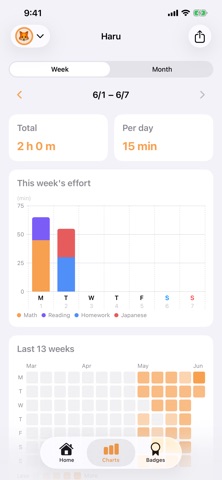
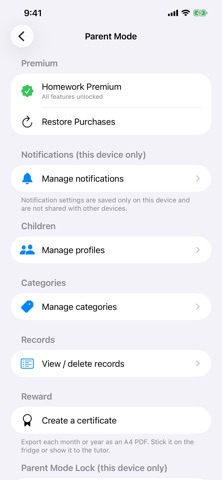
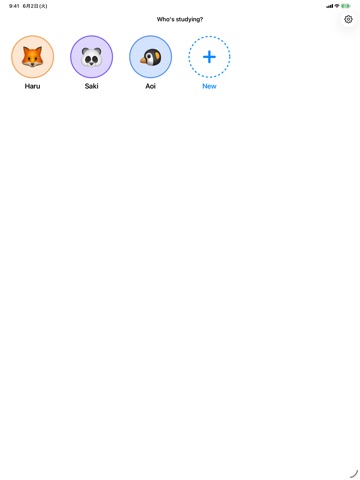
Homework is an iOS app that lets children record, all by themselves, the time they spend on their cram-school and school homework. With a clean, simple interface, a child can use it entirely on their own. What you can do ■ Timer & manual entry A timer you start with a single tap. Forgot to time a session? Add it later with manual entry. ■ Streaks The home screen shows today, your current streak, and this week at a glance. Record at least one minute in a day and it counts. ■ Levels Level up as your study time adds up. The home screen shows "X more minutes to level up," so the next goal is always clear — and each level-up brings a little celebration to keep motivation high. ■ Charts A stacked bar chart, switchable between week and month, shows the balance across subjects. Page back through past weeks and months, and a 13-week heatmap shows how the habit holds up over time at a glance. ■ Badges 300 badges across 27 categories — streaks, total time, subject mastery, a single day's effort, special days, and more. The "next badge" display shows how much is left to earn it. ■ Per-profile colors & avatars Give each child an emoji avatar and a theme color. Switch between siblings with a tap. Profiles and categories can't share the same name, so nothing gets mixed up. ■ Reminders (this device only) Set a reminder time for each child. Settings are saved on this device alone and don't affect other family devices. If the child has already studied that day, that day's reminder is skipped automatically. ■ Parent mode Protect parent mode with a PIN lock. Edit profiles and categories; view, delete, and recategorize records; create a certificate PDF; and export or import your data. ■ Sharing via file Export or import all your data as a ".homeworkbackup" file. When a profile or category has the same name as one you already have, choose to merge them or keep the new one under a different name. Even a record whose category can't be found remembers the category name it was saved with, so you can reassign it later. ■ Privacy by design Every record is stored only on your device and your own iCloud. Nothing is sent to third parties. ■ iCloud sync Syncs automatically across devices on the same Apple ID. To share with a different Apple ID in the family, send and receive a ".homeworkbackup" file. Pricing The app itself is free. A one-time "Homework Premium" purchase (with Family Sharing) unlocks additional profiles, all 300 badges, certificate PDFs, and file-based sharing.
Latest release
What’s New
Updated the app name
Audience growth
Ratings growth
Baseline captured. Growth appears after the crawler observes a changed rating count.
Momentum comes from crawler snapshots for the tracked storefront. “Viral growth signal” means unusually fast recent rating gains; it is an indicator, not download data.
Price tracking
Price intelligence
First snapshot captured. The trend line starts after the next crawler price observation.
- First observed Aug 21, 2026 · 6:39 PM Free
Screenshots