About this app
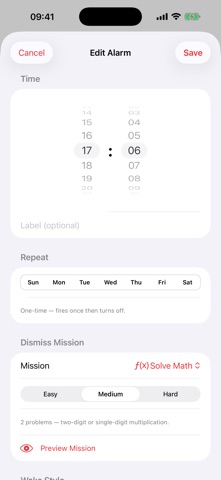
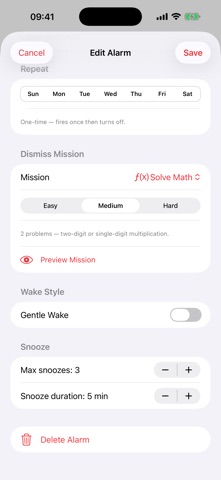
Wake Mission turns your alarm into a challenge you have to solve before you can go back to sleep. Instead of tapping a dismiss button half-asleep, you complete a mission — and only then does the alarm stop. It is the simplest, most effective way to guarantee you actually get up. Choose from five mission types to match your morning style. Solve Math presents arithmetic problems at Easy, Medium, or Hard difficulty. Shake Phone requires 10, 20, or 30 device shakes to prove you are moving. Match Photo asks you to photograph a specific spot in your home — your coffee machine, your front door, your bathroom mirror. Memory Grid shows a pattern on a 3x3, 4x4, or 5x5 grid that you must then recreate from memory. Type Phrase flashes a short phrase and asks you to type it back correctly. Every alarm is fully configurable. Set any time, pick which days of the week it repeats, label it for quick recognition, and choose snooze rules that suit you. Allow up to ten snoozes or none at all, and set the snooze interval from 1 to 30 minutes. Gentle Wake gradually ramps the alarm volume over 30 seconds before reaching full volume, easing you out of deep sleep. After each dismissal, Wake Mission records how long it took you and how many times you snoozed. The Dismiss Stats panel inside each alarm shows your average dismiss time, your fastest ever, and your total snooze count across all recorded wakeups. A live clock on the home screen keeps the time in view at a glance. Tap any alarm to edit it, or preview any mission before saving so you know exactly what to expect when it rings. Wake Mission requires no account and stores everything on-device. Set it up once and it works silently in the background until you need it.
Audience growth
Ratings growth
Baseline captured. Growth appears after the crawler observes a changed rating count.
Momentum comes from crawler snapshots for the tracked storefront. “Viral growth signal” means unusually fast recent rating gains; it is an indicator, not download data.
Price tracking
Price intelligence
First snapshot captured. The trend line starts after the next crawler price observation.
- First observed Aug 17, 2026 · 8:19 PM Free
Screenshots