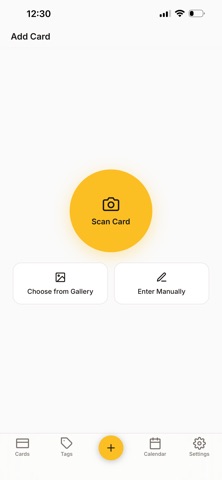
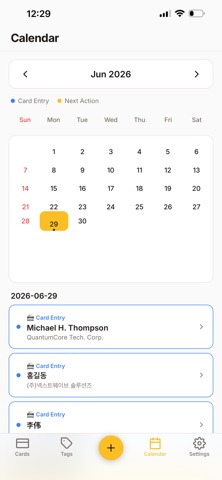
About this app
Magic Business Card — Smart Business Card Management Completed with a Single Scan Have you ever worried about losing a business card every time you receive one? With Magic Business Card, simply take a picture with your camera, and AI automatically recognizes the name, title, company, phone number, email, and address, saving them instantly. Without the hassle of manually entering information one by one, a neatly organized digital business card is created in just a few seconds. Multiple Business Cards in One Scene If you photograph multiple business cards spread out on a table at once, the AI automatically distinguishes and saves each one individually. This allows you to process business cards received at events or networking gatherings all at once, saving significant time. Meeting Notes and Follow-up Management It doesn't stop at saving business cards. You can leave notes on where you met and what you discussed, and record your next actions and follow-up meeting dates, which are automatically displayed on your calendar. The AI summarizes the meeting content and automatically composes context-appropriate follow-up messages, helping you ensure you don't miss important business relationships. Classify at a Glance with Tags You can freely classify business cards by attaching tags of your choice, such as industry, project, or relationship type. The Tag screen allows you to view contacts with the same tag at a glance, enabling you to quickly find the people you need. Complete Privacy Protection All data is stored only on your device. Use it immediately without server transmission or separate sign-up. Thanks to the automatic backup features of iCloud and Google Drive, your data is safely restored even if you switch devices. Systematically manage your valuable network and never miss out on business opportunities.
Latest release
What’s New
Modified to allow saving 2 phone numbers. Modified to allow taking and saving photos of multiple business cards at once.
Audience growth
Ratings growth
Baseline captured. Growth appears after the crawler observes a changed rating count.
Momentum comes from crawler snapshots for the tracked storefront. “Viral growth signal” means unusually fast recent rating gains; it is an indicator, not download data.
Price tracking
Price intelligence
First snapshot captured. The trend line starts after the next crawler price observation.
- First observed Aug 19, 2026 · 9:05 AM Free
Screenshots