About this app
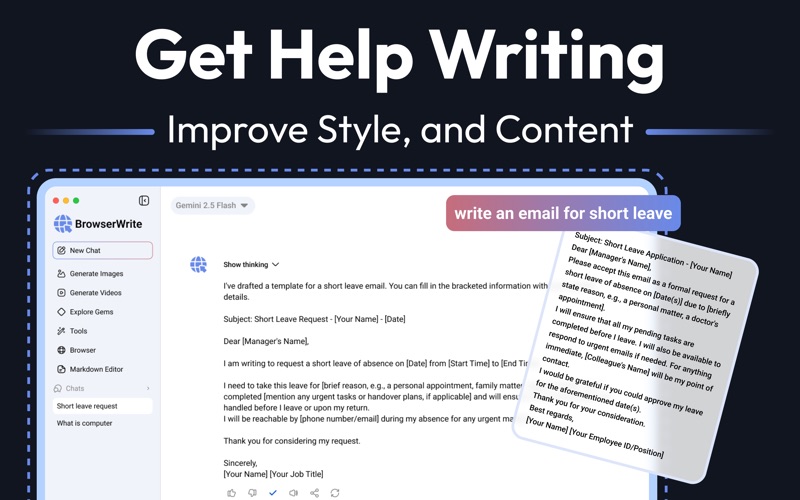
BrowserWrite is the all-in-one AI workspace for Mac. Chat with advanced AI models, browse websites without leaving the app, write in a native Markdown editor, generate high-quality images, and create videos — every tool a modern creator, student, or professional needs, in one clean, fast macOS experience. Whether you're researching for school, drafting emails, building content, coding, or exploring creative ideas, BrowserWrite turns scattered AI tools into a single productivity hub. KEY FEATURES - Smart AI Chat Get instant answers, brainstorm ideas, summarize content, and solve problems with next-generation AI. Switch between models built for deep reasoning and lightning-fast replies. - Built-In Web Browser Browse, read, and analyze any website without leaving the app. Add custom shortcuts to your favorite sites and send page content directly to AI for instant summaries. - Markdown Editor with Live Preview A minimal, fast Markdown editor with split view, live preview, toolbar shortcuts, auto-save, light and dark themes, and one-click export to .md files. Perfect for writers, developers, and note-takers. - AI Toolkit — Your Personal Assistant Access ready-made AI tools across Education, Career, E-Mail, Business & Marketing, Daily Life, Astrology, Art, and Travel. Includes Science Chat, English Teacher, Math Teacher, Citation Generator, Course Generator, Translator, and many more. - Deep Research Mode Get in-depth, source-backed answers for academic study, market research, or fact-checking. Generate quizzes, study guides, and detailed breakdowns on any topic in seconds. - Generate High-Quality Images Turn text into stunning visuals. Choose aspect ratios (1:1, 9:16, 16:9, 4:3, 3:4), control the number of results, and save everything to your Media Library. - Generate Videos from Text & Images Create cinematic videos from text prompts or reference images. Ideal for content creators, marketers, and storytellers. - Custom Experts Use pre-made experts like Career Guide, Chess Champ, Brainstormer, Coding Partner, Learning Coach, and Writing Editor, or build your own custom assistants tailored to your workflow. - Writing Assistant Draft professional emails, leave requests, cover letters, blog posts, and social content. Improve style, grammar, tone, and structure instantly. - Smart Chat History Every conversation is saved, searchable, and organized. Pick up exactly where you left off. - Native macOS Design Built specifically for Mac with a fast, beautiful, distraction-free interface. Light and dark mode supported. WHO IS IT FOR - Students using AI for homework, research, and study notes - Writers, bloggers, and copywriters crafting better content - Developers needing a coding partner and Markdown editor - Marketers generating campaigns, emails, and visuals - Researchers running deep analysis with reliable sources - Anyone tired of switching between chat apps, browsers, image generators, and note tools Subscription Information: Payment will be charged to your iTunes account at confirmation of purchase. Your subscription will automatically renew unless auto-renew is turned off at least 24-hours before the end of the current subscription period. Your account will be charged for renewal within 24-hours prior to the end of the current subscription period. Automatic renewals will cost the same price you were originally charged for the subscription. You can manage your subscriptions and turn off auto-renewal by going to your Account Settings on the App Store after purchase. Read our terms of service and Privacy Policy for more information. For questions or feedback, please contact us at umarabdulwahid93@gmail.com or visit our Customer Support page at https://sites.google.com/view/uaw-apps/customer-support Privacy Policy: https://sites.google.com/view/uaw-apps/privacy-policy Terms of Use: https://sites.google.com/view/uaw-apps/terms-of-use EULA: https://www.apple.com/legal/internet-services/itunes/dev/stdeula
Latest release
What’s New
- Bugs fixing
Audience growth
Ratings growth
Baseline captured. Growth appears after the crawler observes a changed rating count.
Momentum comes from crawler snapshots for the tracked storefront. “Viral growth signal” means unusually fast recent rating gains; it is an indicator, not download data.
Price tracking
Price intelligence
First snapshot captured. The trend line starts after the next crawler price observation.
- First observed Aug 9, 2026 · 12:04 AM Free
Screenshots