About this app
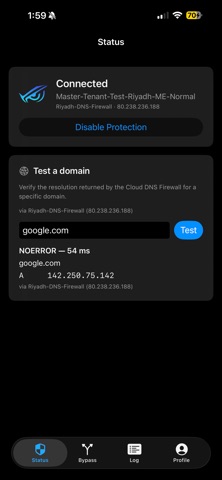
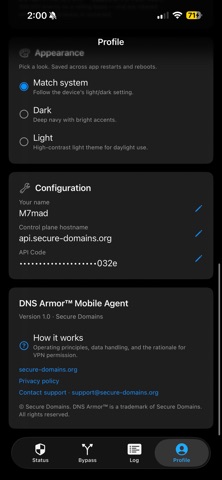
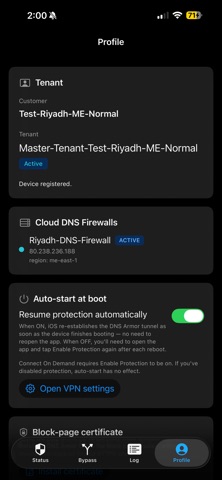
DNS Armor™ for iOS is the iPhone and iPad agent for the Secure Domains DNS Firewall — an enterprise DNS protection service that blocks phishing, malware, command-and-control callbacks, and policy-violating domains at the resolver layer. IMPORTANT — HOW DNS ARMOR WORKS ON iOS DNS Armor™ uses Apple's Network Extension framework (Packet Tunnel Provider, NEPacketTunnelProvider) to install a local on-device VPN. This on-device VPN is the only way Apple permits third-party iOS apps to apply DNS protection system-wide. The VPN exists for one purpose: to intercept DNS queries from every app on your device so they can be securely resolved through your organization's DNS firewall. To be explicit about what this VPN does and does not do: • It intercepts DNS traffic only. Every DNS query from every app — Safari, Mail, Messages, third-party apps, background services — is captured and forwarded to your organization's Secure Domains cloud resolver over an encrypted DNS-over-QUIC (DoQ, RFC 9250) channel with certificate pinning. • It does NOT proxy your web traffic. HTTPS, video, FaceTime, downloads, and every other non-DNS data flow goes directly from your device to its destination, unmodified and never read by DNS Armor™. • It does NOT inspect SSL/TLS, decrypt content, or log browsing activity. • It does NOT route traffic through any external VPN server. The "VPN" is purely an on-device mechanism iOS requires for DNS interception — there is no remote tunnel, no IP-address change, no anonymization. iOS will display the standard one-time system prompt asking you to allow the VPN configuration. This is required for DNS Armor™ to function. The DNS Armor™ agent integrates with Connect-On-Demand for auto-start after reboot, Per-App VPN for BYOD, and Apple's Managed App Configuration channel for MDM-driven zero-touch enrollment. WHAT YOU GET • System-wide DNS protection via on-device Network Extension VPN • Encrypted DNS-over-QUIC with certificate pinning • Cloud-managed policy — your admin controls the blocklist • Per-domain bypass for internal/corporate names that need private DNS resolvers • Auto-start at boot via Connect-On-Demand • Real-time block-page redirection so users see why a site was blocked • Operational status reporting back to your admin console • Full MDM Managed App Configuration support — Jamf, Intune, Workspace ONE, Kandji, Mosyle • Per-app VPN profile compatible for BYOD scenarios • Native IPv4 and IPv6 support end-to-end FOR WHO DNS Armor™ for iOS is built for organizations enrolled in the Secure Domains DNS Firewall. An API code issued by your IT administrator is required to onboard. Without one the app cannot connect — it is not a consumer DNS app. GETTING STARTED Your admin provides an API code. Paste it on first launch, tap Enable Protection, and accept the iOS VPN configuration prompt. From then on, DNS Armor™ stays connected silently and reconnects automatically after reboot. For MDM-managed devices, the API code, hostname, and protection toggle can be pre-populated via Managed App Configuration — first launch completes with no end-user interaction. PRIVACY DNS Armor™ does not log your browsing activity to any third party. Encrypted queries go only to your organization's Secure Domains tenant — never to advertising networks or consumer DNS providers. Non-DNS traffic is not inspected or routed through the agent. The app reports only the minimum operational telemetry needed for enrollment and admin visibility (synthesized device ID, public/private IP, current connection state). See secure-domains.org/privacy. REQUIREMENTS • iOS or iPadOS 16.0 or later • An active Secure Domains DNS Firewall tenant • An API code issued by your administrator DNS Armor™ is a trademark of Secure Domains.
Latest release
What’s New
Version 1.1 • More reliable connection — Protection no longer turns on when the service is unreachable, preventing brief connect/disconnect cycles. • Faster recovery — automatically detects when the service is back and resumes protection without needing a restart. • Smoother performance on busy pages — duplicate lookups are handled more efficiently. • Picks up changes faster — newly configured firewalls are detected without waiting. • Reduced background activity for better battery life.
Audience growth
Ratings growth
Baseline captured. Growth appears after the crawler observes a changed rating count.
Momentum comes from crawler snapshots for the tracked storefront. “Viral growth signal” means unusually fast recent rating gains; it is an indicator, not download data.
Price tracking
Price intelligence
First snapshot captured. The trend line starts after the next crawler price observation.
- First observed Aug 19, 2026 · 3:17 PM Free
Screenshots