About this app
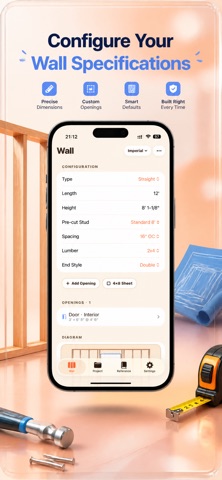
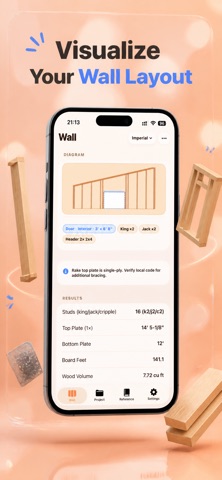
Plan wall framing in seconds — straight walls and rake (gable) walls both supported. Get stud counts, plate lengths, header sizes, cut lists, mark-out positions, and 4×8 sheet layouts for every wall. Built for iOS 17. Works entirely on your iPhone. No accounts. No data collection. No ads. WHAT YOU CAN DO • FRAME A SINGLE WALL Enter wall length, height, and on-center spacing (12", 16", 19.2", or 24"). Choose 2x4 or 2x6 lumber. Get instant stud counts, top and bottom plate lengths, board feet, wood volume, and wall area, with a live visual layout and your choice of end-stud configuration (single, double, California corner, or gap corner). • RAKE AND GABLE WALLS Switch to rake mode and enter a pitch (3:12, 4:12, 6:12, 8:12, 9:12, 12:12, or custom) or the low and high heights. The app outputs the exact length of every stud, ready to cut. • DOORS, WINDOWS, AND CORNERS Drop in any opening with its rough opening dimensions. King studs, jack studs, cripples, sills, and headers are calculated for you. The layout adjusts in real time around every opening. • 4×8 SHEET LAYOUT Toggle the sheathing overlay to see exactly where OSB or plywood panels land on your wall. Edges that fall on a stud are highlighted green; unsupported joins are flagged red so you can adjust before you start nailing. • PRE-CUT STUD PRESETS One tap loads standard pre-cut heights: 92-5/8" (8' wall), 104-5/8" (9' wall), or 116-5/8" (10' wall). The wall height is set for you including plate thickness. • MARK-OUT GUIDE Get a copy-ready list of measured positions along the plate. Copy to clipboard, print, or include in the PDF — perfect for marking studs on-site without re-counting. • MULTI-WALL PROJECTS Save entire framing jobs across multiple walls with intersection tracking (T-junctions automatically deduct shared studs from the total). Track totals: studs, plates, board feet, wood volume, wall area, and estimated cost. Export a professional PDF with diagrams, cut lists, mark-out positions, and material summary. • IMPERIAL AND METRIC Work in feet-inches-fractions down to 1/8", or in millimeters. Switch units at any time without losing your project. • IRC REFERENCE BUILT IN Quick-access cheat sheets: IRC R602.7 header sizing for load-bearing openings, nominal vs. actual lumber dimensions, common rough opening sizes for doors and windows, corner stud configurations, and roof pitch to angle conversions. PRIVACY FIRST StudPlan runs 100% on-device. No login. No analytics. No advertising. No tracking SDKs. Nothing about your projects ever leaves your iPhone. The app does not request camera, photo library, location, microphone, or any other permission. 3-day free trial, then $1.99/week. Monthly, yearly, and lifetime options available. Cancel anytime. Terms of Use: https://taxlite.net/stud_plan/terms.html Privacy Policy: https://taxlite.net/stud_plan/privacy.html
Latest release
What’s New
What's new in 1.5: • Tap any field to instantly type over the old value — no more deleting it first • Position doors and windows from the left edge, the right edge, or center them with one tap • Deleting a project, wall, or preset now shows an Undo option for a few seconds • A quick confirmation appears whenever you save a wall, preset, or project • Duplicate Last Wall — start your next wall in a project pre-filled with the last one's settings 100% offline, on-device — no accounts, no ads, no tracking.
Audience growth
Ratings growth
Baseline captured. Growth appears after the crawler observes a changed rating count.
Momentum comes from crawler snapshots for the tracked storefront. “Viral growth signal” means unusually fast recent rating gains; it is an indicator, not download data.
Price tracking
Price intelligence
First snapshot captured. The trend line starts after the next crawler price observation.
- First observed Aug 24, 2026 · 4:12 AM Free
Screenshots