About this app
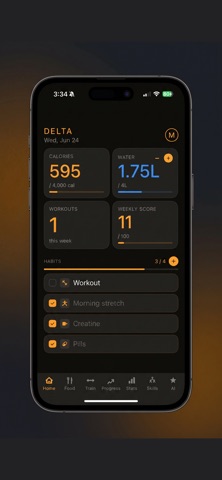
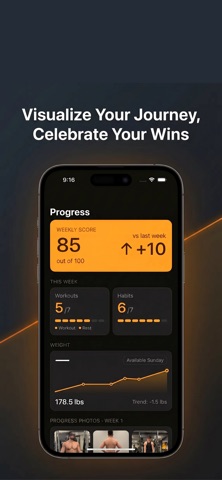
Delta is the all-in-one fitness companion built for serious lifters who want everything in one place — no excuses, no missed sessions, no lost progress. Track your workouts with a full exercise library and custom muscle map that shows exactly what you've trained. Log your nutrition with AI-powered food scanning or manual entry. Build daily habits that stick. Monitor your weight trend, progress photos, and weekly score week over week. Delta keeps you accountable with daily tasks, Sunday check-ins, and an AI Coach that gives you personalized insights based on your actual data — not generic advice. Built for athletes who are locked in. What's inside: - Workout tracker with front and back muscle map - AI food logging via camera or text - Habit tracking with streaks and daily score - Weekly progress photos and weight trend - Personal bests, muscle balance radar, and monthly heatmap - Fully customisable — accent colours, goals, units
Latest release
What’s New
Skills Completely redesigned the calisthenics skill progression screen. Each category (Push, Pull, Balance, Core, Legs) now shows a clean linear journey — one skill flowing into the next, with a progress bar showing how many skills you've mastered in that category. Added a road map view (toggle button in the header) that shows your full skill path as a horizontal visual trail — circles connected by lines, colour-coded by mastery status. New All tab: a radial mind map showing every skill across all categories in one view, with each category branching outward from a central node. Supports pinch-to-zoom, drag to pan, and +/− zoom buttons. New Hybrid tab: curated foundational exercises organized by Push Day, Pull Day, and Legs Day — exercises you can add to regular gym sessions to build calisthenics strength faster. Tap any exercise to expand form tips and see which skills it builds toward. Muscle diagram in skill detail now matches your chosen accent colour instead of always showing yellow. Balance category is now teal, distinct from Pull's blue, making each category easier to identify at a glance. Nutrition Food logging camera: the Food / Barcode / Label mode switcher moved from the top of the screen down to the bottom, next to the shutter button — easier to reach with one thumb. Mode switcher buttons are now rounded rectangles instead of ovals, and slightly larger. When a food is identified, calorie display now shows "cal" instead of "kcal." Calories, protein, carbs, and fat values are colour-coded (blue / red / orange / green) to match the macro cards in the log. Saved meals now display as styled cards with colour-coded macros, matching the look of logged meals. Stats The muscle frequency breakdown (showing which muscle groups you've trained and how often) is now collapsed by default under the radar chart. Tap the chart to expand or collapse it, keeping the screen clean at a glance. Bug Fixes Fixed a bug preventing food logging and the use of the AI coach.
Audience growth
Ratings growth
Baseline captured. Growth appears after the crawler observes a changed rating count.
Momentum comes from crawler snapshots for the tracked storefront. “Viral growth signal” means unusually fast recent rating gains; it is an indicator, not download data.
Price tracking
Price intelligence
First snapshot captured. The trend line starts after the next crawler price observation.
- First observed Aug 24, 2026 · 6:32 PM Free
Screenshots