About this app
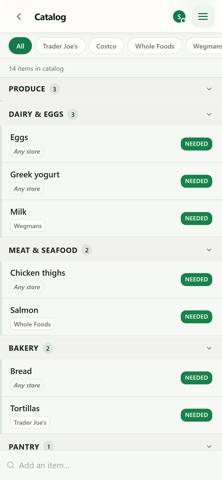
Cartful is the grocery list your whole household can actually keep up with. One shared list. Everyone in the house adds to it, and changes show up on every phone the moment they happen, so whoever is at the store has the current list. NO ACCOUNTS, NO PASSWORDS Create a household and share the 6-character join code. Anyone with the code is in. BUILT FOR THE AISLE Big tap targets, items grouped by aisle, and a progress bar for what is left. Tap to check something off, or tap Not here when the shelf is empty. Swiping works too. PLAN, THEN SHOP Pick what you need this trip, marking each item Needed, Maybe or Not now. Then switch to Shop and check things off. Items you pass on stay in your catalog for next time. HANDS FULL? SAY IT Tap the mic: "we need eggs", "got the milk", "skip the bread". A LIST PER STORE Tag each item with where you buy it. Start a trip for one store and you get exactly that store's list. WORKS WITHOUT A SIGNAL Check things off in the freezer aisle or the basement store. It all catches up when you are back online. REMEMBERS WHAT YOU BUY Your catalog builds itself as you shop. Type a few letters and next week's item is already there. PHOTOS Attach a photo so whoever is shopping grabs the right brand. PASTE A LIST YOU ALREADY HAVE Paste from Notes or a text. Each line becomes an item, filed into the right category. SEE HOW THE TRIP WENT Finish a trip for a summary of what you got, what was out of stock, and what you didn't get. LIGHT OR DARK Follows your phone by default, or pin it. Text scales with your system setting. FREE No ads, no tracking, no subscription. Privacy policy: https://cartful.aloedesk.com/privacy
Latest release
What’s New
- Tap an item in Plan to put it on the trip, tap again to take it off. Hold it to edit. - Undo a mis-tap. Checking off, Not here and dropping an item all offer Undo. - "Not here" is a button next to the checkbox. It reads "Put back" once tapped. - One search on every list finds what is there, pulls in what is not, or adds it new. - After your first store, paste in the things you usually buy. - A store card shows a progress bar while you shop, and its counts stay right when the shop is out of something. - Plan and Shop are easier to tell apart. The one you are in is filled in.
Audience growth
Ratings growth
Baseline captured. Growth appears after the crawler observes a changed rating count.
Momentum comes from crawler snapshots for the tracked storefront. “Viral growth signal” means unusually fast recent rating gains; it is an indicator, not download data.
Price tracking
Price intelligence
First snapshot captured. The trend line starts after the next crawler price observation.
- First observed Sep 12, 2026 · 2:56 AM Free
Screenshots