About this app
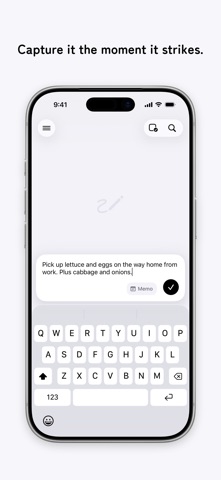
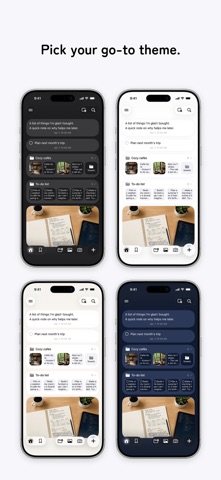
Nokosu is an app for instantly "keeping" memos, to-dos, camera photos, album images, and more. With its simple, effortless feel, you can jot down your thoughts just as they come. ■ Capture the moment One button in the bottom-right corner. Text, a photo you snap on the spot, or an image from your library — save it the instant it comes to mind. ■ Memos and to-dos Text you want to keep goes in a memo; things to get done go in a to-do. Both are just as quick to save the moment they come to mind — and you can switch between memo and to-do anytime. ■ Stack to organize Just stack one memo onto another and a new folder is created automatically. Things tidy themselves with a simple touch. ■ Drag & drop, freely Move memos and folders anywhere with drag & drop. Reorder them, move them in and out of folders — everything just as you like. ■ Look back on the calendar You can browse your memos on a calendar, by the date they were created. ■ iCloud sync Sync your memos in real time across devices signed in with the same Apple ID. ■ Bookmarks Bookmark important memos and call them up anytime from the Bookmarks list. ― Nokosu Pro ― A monthly plan that bundles features for keeping things even more conveniently. ■ Nested folders The free version lets you create folders at the top level only; with Pro, you can also create folders on deeper levels. ■ Locked Folder Lock sensitive memos, images, and folders with Face ID. Nothing in the Locked Folder appears on Home, in search, or in any list, and you can move existing memos, images, and folders into it. ■ Full history in Memos & Images On the Memos and Images pages, look back at memos and images older than one month. ■ All themes available In addition to the default Light theme, dress up the app with Dark, Beige, Navy, and White. ■ Customize how folders look Set a color and an icon for each folder. The free version comes with the basic colors, and Pro unlocks every color and every icon. ■ Quick input The keyboard appears the moment you open the app, so you can start writing right away without tapping the input button. ■ Lock Screen widget Create a note or add a photo with a single tap from the Nokosu widget on your Lock Screen. ■ Control Center widget Create a note or add a photo with a single tap from the Nokosu widget in Control Center or on the Action button. ■ Save to Photos too When you capture a photo memo in the app, you can also copy the photo to your Photo Library. Terms of Use https://nokosu.app/en/terms/ Privacy Policy https://nokosu.app/en/privacy/
Latest release
What’s New
・Added a Locked Folder. Keep sensitive memos, images, and folders in a dedicated folder locked with Face ID. ・You can now add titles to memos. ・Plus various small improvements and bug fixes.
Audience growth
Ratings growth
Baseline captured. Growth appears after the crawler observes a changed rating count.
Momentum comes from crawler snapshots for the tracked storefront. “Viral growth signal” means unusually fast recent rating gains; it is an indicator, not download data.
Price tracking
Price intelligence
First snapshot captured. The trend line starts after the next crawler price observation.
- First observed Sep 11, 2026 · 8:31 AM Free
Screenshots