About this app
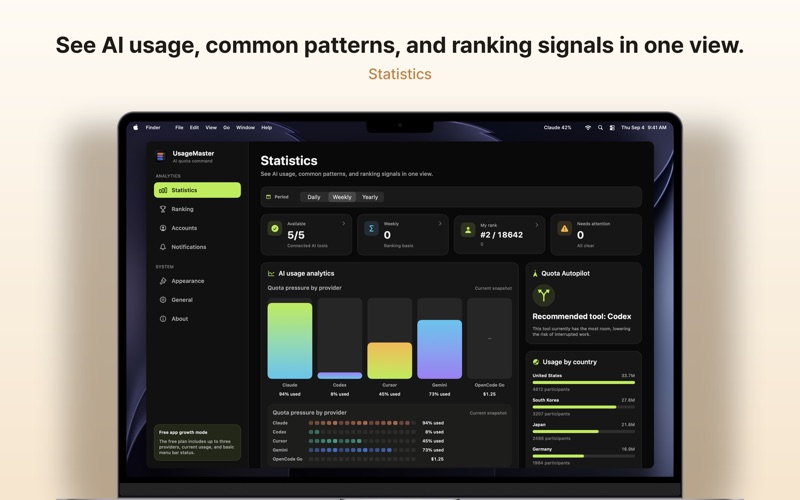
Know which AI coding tool to use before you hit the limit. UsageMaster is a macOS menu bar app that brings together usage and reset times for Claude Code, Codex, Gemini CLI, OpenCode Go, and Cursor. It goes beyond showing numbers: it compares your current quota state and helps you decide whether to keep running, wait for a reset, or switch tools. ◆ Features • AI quota autopilot: recommends which tool to use now • See your primary AI usage rate instantly in the menu bar • Compare Claude Code, Codex, Gemini CLI, OpenCode Go, and Cursor usage side by side • View 5-hour limits, weekly limits, and per-model usage • Color-coded status indicators by usage level • One-time notification when you reach your configured threshold • Reorder tools so your most-used one shows in the menu bar • The top-pinned tool's usage rate is always visible in the menu bar Scope note: UsageMaster measures terminal/CLI AI coding tools and Cursor usage only through the Cursor Cookie header you explicitly save. It does not automatically measure web/desktop app usage. The Cursor Cookie header is stored only in Keychain. ◆ Pro The free plan includes up to three providers, ranking, appearance presets, and basic menu bar status. Start a free 7-day Pro trial through a $0 App Store non-consumable purchase; it is not a subscription and never charges automatically. Lifetime Pro is a one-time purchase (US $9.99; local App Store prices may vary) that unlocks all supported providers, widgets, Focus View, quota forecasts, tool recommendations, and advanced alerts. Existing paid users keep Legacy Pro automatically. Pro also lets you register several Claude accounts, see a usage card for each, and switch the Claude Code login between them with one click through the Keychain. ◆ Safe, Local-First Usage Tracking UsageMaster never stores or logs raw API keys or tokens. OpenCode Go usage is read from local usage files on your Mac and never sent to external servers. Codex usage is fetched from the ChatGPT usage API with the sign-in credential Codex CLI stores on your Mac; Kimi uses the Kimi Code CLI credential, and GitHub Copilot signs in to GitHub inside the app. Credentials are never stored or sent elsewhere. Claude Code usage is fetched from Anthropic's usage API using the sign-in credential Claude CLI stores on your Mac; the credential is never stored or sent anywhere else. Cursor usage is queried only from cursor.com usage-summary with the Cookie header you explicitly save in Keychain. Gemini CLI quota data is fetched through the Google Code Assist endpoint. ◆ Perfect For • Developers who have been interrupted by AI coding tool limits • Developers using Claude Code, Codex, Gemini CLI, OpenCode Go, and Cursor together • Anyone who wants remaining quota and reset times in one place • Anyone who wants a safe usage tracker that does not store raw credentials ◆ Supported Tools • Claude Code • Codex • Gemini CLI • OpenCode Go • Cursor • Kimi • GitHub Copilot • More coming soon ◆ Feedback Send feedback directly from Settings > About inside the app. To request deletion of stored feedback, email the address below. dlaudwls1203@gmail.com
Latest release
What’s New
Version 1.2.4 shows the Claude card like claude.ai with current session, weekly limits, and usage credits, and adds a reset countdown, a retry button, and reset and credit notifications. Codex now fetches limits directly from the ChatGPT usage API, and the App Store version can show Kimi and GitHub Copilot usage. You can also register credential files for several Claude accounts and see one card per account. Claude server lookups now access the Keychain only after an in-app explanation and your consent, and the card shows the cause and a fix button whenever something goes wrong. With Pro you can switch the Claude Code login to any registered Claude account right inside the app and back up the current account as a credential file. Expired accounts are never refreshed; the app asks you to sign in again in Claude Code. Feedback can now be sent directly from Settings > About, no mail app needed.
Audience growth
Ratings growth
Baseline captured. Growth appears after the crawler observes a changed rating count.
Momentum comes from crawler snapshots for the tracked storefront. “Viral growth signal” means unusually fast recent rating gains; it is an indicator, not download data.
Price tracking
Price intelligence
First snapshot captured. The trend line starts after the next crawler price observation.
- First observed Aug 11, 2026 · 7:14 PM Free
Screenshots