About this app
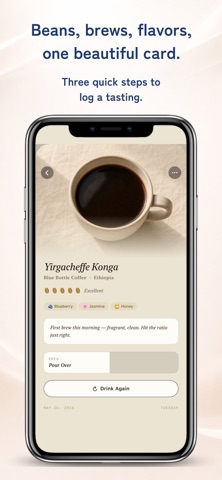
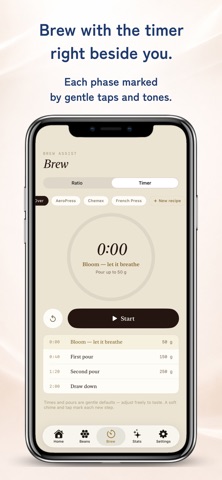
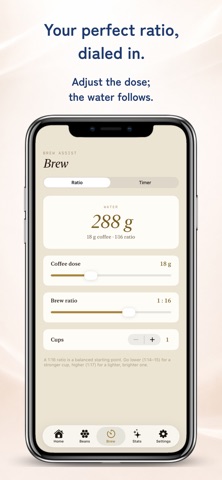
Brew with confidence, then remember. A quiet notebook for specialty coffee lovers. "What was that bean from last Saturday?" "That perfect cup at the cafe in Kyoto — I'd love to find it again." MyBrewNote is for the small details that slip away. And the brewing technique that helps you make them happen. ▸ Features ◎ Brew Assist · Ratio Calculator Choose your coffee dose and brew ratio (1:12–1:18). The water amount calculates in real time. Adjust cups, ratio, or dose and watch the recipe update instantly. · Step-by-Step Timer Built-in plans for Pour Over, AeroPress, Chemex, and French Press. Phase prompts (bloom, pour, drawdown) with haptic and audio cues at each transition. · Custom Recipes (Premium) Save your own brewing methods — name them, time them, pour to your own targets. Reusable from any session. ◎ Coffee Journal · Bean Library Record name, roaster, origin, region, processing, roast level, and notes. Up to 10 photos per bean (Premium). · Tasting Records Brew method, location, 5-bean rating, flavor tags, and a free-form note. Three quick steps from start to saved. ◎ Palate Profile · A radar chart of aroma, sweetness, body, bitterness, and acidity. · Country rankings, recurring flavors, brew method patterns. · The more you log, the clearer your taste becomes. ◎ Other Features · Square photo crop (pinch, drag, frame your cup) · Polaroid-style share card (4:5 vertical) · PDF tasting report (Premium) · CSV export (Premium) · Optional daily reminder at your chosen time · English and Japanese, auto-switched by device ▸ Made for · Specialty coffee drinkers learning to put words to flavors · Home baristas exploring pour-over, AeroPress, espresso · Cafe-hoppers building a record of their favorite cups · Anyone curious about their own taste evolution · People who tried generic note apps and felt the aesthetic was off ▸ Privacy Everything you record stays on your device. No cloud sync. No accounts. No tracking. No analytics. Your taste is your own. Your records back up with your iPhone via standard iCloud backup (handled by iOS, not by us).
Latest release
What’s New
Stability improvements and overall performance optimizations.
Audience growth
Ratings growth
Baseline captured. Growth appears after the crawler observes a changed rating count.
Momentum comes from crawler snapshots for the tracked storefront. “Viral growth signal” means unusually fast recent rating gains; it is an indicator, not download data.
Price tracking
Price intelligence
First snapshot captured. The trend line starts after the next crawler price observation.
- First observed Sep 4, 2026 · 6:13 AM Free
Screenshots