About this app
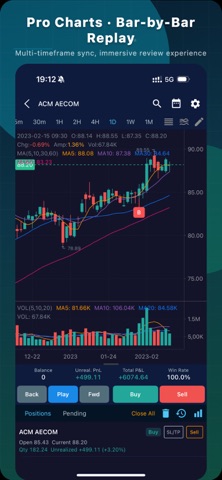
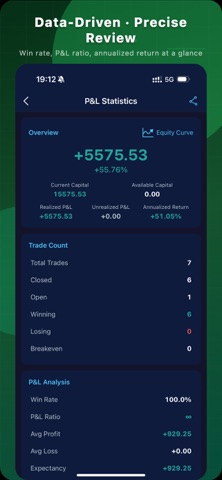
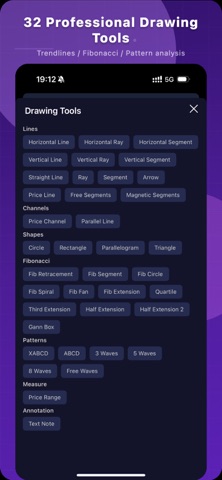
iTradeTrainer — a professional K-line (candlestick) replay and trading simulation training tool. Practice your trading strategies over and over with nearly 20 years of real historical market data, and build market intuition and trading discipline in a zero-risk environment. Available on Web, Windows, macOS, and mobile — one account works across all platforms. On desktop, analyze multiple charts side by side on a big screen and place simulated orders instantly with keyboard shortcuts for deeper, more efficient review sessions. On mobile, practice anytime, anywhere in fragments of spare time, and switch between devices freely. Key Features Bar-by-Bar Replay 13 timeframes (intraday, 1-minute up to monthly), multi-speed playback (0.1x–5x), and free step-forward / step-back control. Train your market intuition one candlestick at a time in an immersive replay experience. Multi-Timeframe Synchronized Analysis View up to four synchronized charts of different timeframes at once, with customizable layouts including 2×2 grid and horizontal / vertical split. Use higher timeframes to define the trend and lower timeframes to find entries — just like real multi-screen trading. Simulated Trading Market orders fill instantly and limit orders trigger automatically, with support for stop-loss / take-profit, partial close, and forced liquidation. Two position-sizing modes — full margin and fixed amount — for a realistic trading experience. Draw-to-Order Drag a line directly on the chart to set your limit order price. Drawings and order status stay in sync in real time — placing an order is as intuitive as drawing. Double-Blind Training Mode Hides the symbol name and time information and replays randomly selected instruments, forcing you to rely purely on price action. Eliminate hindsight bias and truly test whether your trading system works. Extensive Market Coverage Over 23,000 instruments across major global markets, including Shanghai / Shenzhen A-shares, Beijing Stock Exchange, ETFs / LOFs, convertible bonds, indices, futures, forex, and US stocks — with online data ready to use out of the box. Professional Charting Tools 31 technical indicators (MA, MACD, KDJ, RSI, Bollinger Bands, and more) and 32 drawing tools (trend lines, Fibonacci, Gann Box, Elliott Wave, and more), with magnet snapping and cross-timeframe drawing sync. TDX Formula Support Compatible with TDX (Tongdaxin) formula syntax — write and import your own custom indicators and keep the analysis workflow you're used to. Performance Statistics Automatically tracks win rate, profit/loss ratio, cumulative return, and maximum drawdown, and visualizes your performance with an equity curve — let data drive your improvement. Intraday Chart with Average Price Line Built-in DAVP (daily average volume price) indicator that switches automatically by trading day — ideal for day-trading practice. Who Is It For Trading learners who want systematic practice without taking real risks Technical analysis enthusiasts who need to backtest and validate their strategies Beginner and intermediate traders building market intuition and discipline A supplementary training tool for securities and futures professionals Membership Free trial upon registration, with a range of membership plans to choose from. Disclaimer This app is for learning and simulation training purposes only. It does not provide real trading services and does not constitute any investment advice. Historical market data is for reference only and does not represent future market performance. Investment involves risk — trade with caution. Official Website: https://itradetrainer.raoyunsoft.com/
Latest release
What’s New
1. Major drawing upgrade: auto-saved and restored, restyle or delete individual drawings, magnet mode is now a global toggle. 2. Add notes to each trade, view per-symbol P&L in order history, and filter the equity curve by date range. 3. Adjusted price data is now supported for accurate historical continuity; redesigned order screens. 4. Buy/sell markers appear almost instantly, smoother long-press fast replay, plus performance and memory optimizations. 5. Fixed a false "end of data reached" during replay and incorrect order timestamps from timezone conversion.
Audience growth
Ratings growth
Baseline captured. Growth appears after the crawler observes a changed rating count.
Momentum comes from crawler snapshots for the tracked storefront. “Viral growth signal” means unusually fast recent rating gains; it is an indicator, not download data.
Price tracking
Price intelligence
First snapshot captured. The trend line starts after the next crawler price observation.
- First observed Aug 20, 2026 · 1:47 AM Free
Screenshots