About this app
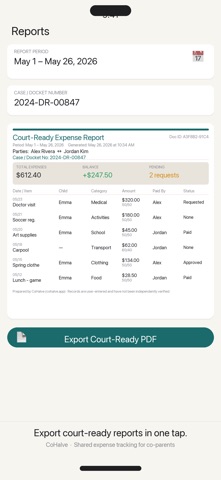
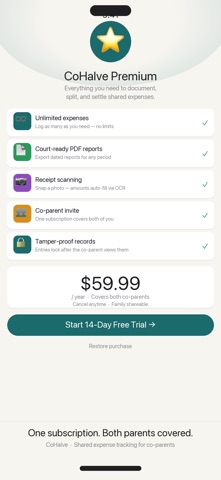
CoHalve is the expense-first co-parenting app built for modern families. Log shared expenses in seconds, split them exactly, request reimbursements, and export court-ready PDF reports — no lawyer required. ALWAYS KNOW WHO OWES WHAT A real-time running balance shows exactly what your co-parent owes you (or vice versa), updated the moment you log an expense. No more spreadsheets, no more disputes over "who paid for that?" COURT-READY PDF REPORTS IN ONE TAP Export a professionally formatted expense report with case number, both parties' names, a full transaction table, and summary totals. Covers all 9 fields required by most court custody agreements — automatically. SCAN RECEIPTS IN SECONDS Point your camera at any receipt and CoHalve reads the amount using on-device OCR — no manual entry. Just confirm and save. FLEXIBLE SPLITS, NOT JUST 50/50 Log any ratio: 60/40, 70/30, or any custom percentage. Per-child tagging keeps expenses organized when you have multiple children with different custody arrangements. REIMBURSEMENT WORKFLOW THAT WORKS Request → Approve or Decline → Mark Paid. Every step is timestamped. Your co-parent gets a 3-day nudge if they haven't responded. TAMPER-PROOF RECORDS Once your co-parent views an entry, it locks automatically — protecting the integrity of your shared ledger. No backdating, no editing disputes. START TRACKING TODAY — NO ACCOUNT NEEDED Log your first expense in under 60 seconds with no login required. Add your co-parent whenever you're ready. COHALVE PREMIUM — $59.99/YEAR (COVERS BOTH PARENTS) • Unlimited expense logging • Court-ready PDF export • Receipt scanning with auto-fill • Co-parent invite (one subscription for both) • Tamper-proof locked records • Reimbursement reminders • 14-day free trial, cancel anytime Free to start with 10 expenses. Upgrade when you need more. Privacy: All data is stored on your device. CoHalve never sells your data or uses it for advertising. Terms of Use (EULA): https://www.apple.com/legal/internet-services/itunes/dev/stdeula/
Audience growth
Ratings growth
Baseline captured. Growth appears after the crawler observes a changed rating count.
Momentum comes from crawler snapshots for the tracked storefront. “Viral growth signal” means unusually fast recent rating gains; it is an indicator, not download data.
Price tracking
Price intelligence
First snapshot captured. The trend line starts after the next crawler price observation.
- First observed Aug 17, 2026 · 11:05 PM Free
Screenshots