About this app
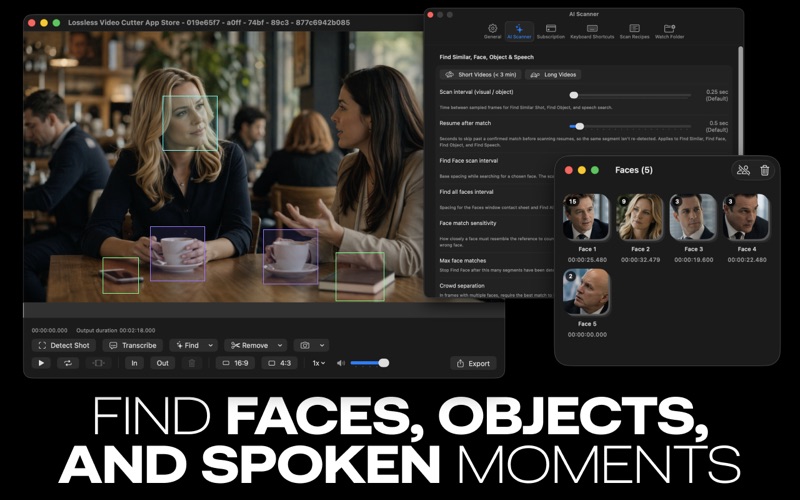
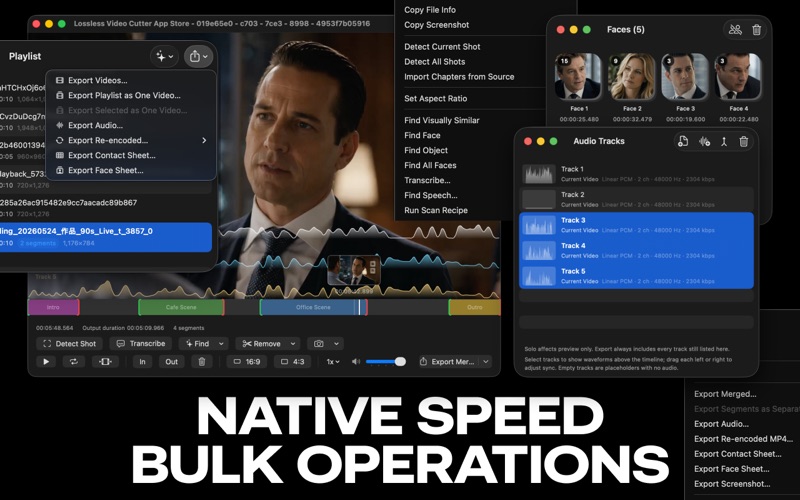
Lossless Video Cutter is a native Mac app for finding, trimming, and exporting the moments that matter. Mark what you want to keep, preview only your selection, then export one combined file or separate clips. The app copies the original video and audio without re-encoding, so there is no generation loss. Built for fast review, clean archives, social clips, interviews, screen recordings, camera footage, and long files where you only need the useful moments. TRIM AND REVIEW Lossless, keyframe-aligned trimming for compatible media In and Out workflow for marking multiple keep segments Interactive timeline with draggable edges, segment labels, colors, and notes Play Segments Only mode to skip removed portions during preview Invert selection, zoom and pan, playback speeds, shuttle controls, and frame stepping Detect the shot at the playhead or scan the entire file Import source chapter markers as segments Preview SRT and WebVTT subtitles FIND THE RIGHT MOMENTS Search by description using on-device visual search with live thumbnail results Pause on a frame and select a highlighted face, or use a reference photo, to find matching shots or quickly build segments from that person's appearances Find All Faces, label people, browse their appearances, and merge duplicate results Find visually similar shots from the current frame or an image Transcribe audio, search for spoken words or phrases, and export SRT or WebVTT subtitles on macOS 26 or later Remove silence, black screens, freeze frames, blurry sections, or low-motion sections EXPORT AND ORGANIZE Export selected segments as one lossless file or separate clips Export a re-encoded MP4 with exact, frame-accurate cut points when keyframe-aligned trimming is not enough Queue files in a playlist for batch Find and export, or combine multiple playlist videos into one output Export audio tracks, contact sheets, face sheets, and current frames Create a video from a still image and audio Add, remove, replace, solo, and mix audio tracks Export EDL and FCPXML for other editing workflows Save and reopen .lvc project packages Recover unsaved segments, scan results, face labels, transcripts, and other working state Use customizable keyboard shortcuts throughout the app PRIVATE ON-DEVICE PROCESSING All media analysis, previews, editing, exports, face recognition, visual search, and speech transcription happen on your Mac. Your media is not uploaded for these features. No FFmpeg installation is required for normal use. Lossless Video Cutter works with formats macOS can read, including MP4, MOV, M4V, MTS/M2TS/TS, MXF, and more. Merged MKV and WebM passthrough export is available for compatible sources. FREE AND PRO The core trimming workflow, shot detection, playlists, lossless export, and a limited number of successful Find by Description searches are free. Free users get two successful searches per video and ten across a rolling seven-day period. Searches with no results do not count, and refining a query while you type shares one credit. Pro unlocks unlimited Find by Description, face and visual similarity search, transcription and speech search on macOS 26 or later, silence and visual cleanup tools, frame-accurate re-encoded MP4 export, advanced audio tools, professional interchange, and batch workflows. Privacy Policy: https://losslessvideocutter.com/privacy-policy/ Terms of use (EULA): https://www.apple.com/legal/internet-services/itunes/dev/stdeula/ Support: https://losslessvideocutter.com/support/
Latest release
What’s New
Find by Description now includes free searches and improved results. Pause on a frame to highlight faces, then search or build segments. Faster, more reliable visual search preparation and caching. Improved project saving, session recovery, and overall stability.
Audience growth
Ratings growth
Baseline captured. Growth appears after the crawler observes a changed rating count.
Momentum comes from crawler snapshots for the tracked storefront. “Viral growth signal” means unusually fast recent rating gains; it is an indicator, not download data.
Price tracking
Price intelligence
First snapshot captured. The trend line starts after the next crawler price observation.
- First observed Aug 8, 2026 · 3:19 PM Free
Screenshots