About this app
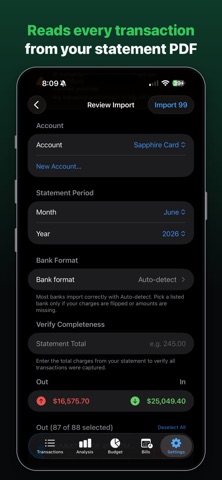
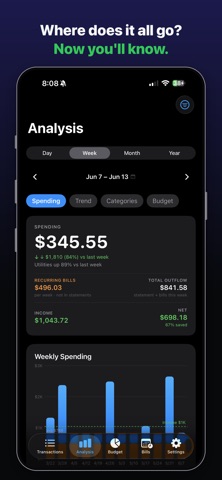
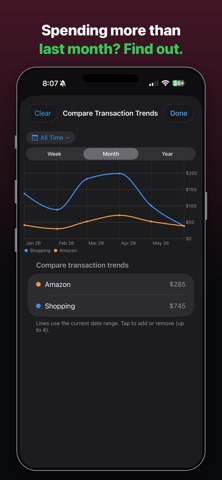
As automatic as the bank-linked apps. As private as pen and paper. Local Budget reads the statements you already download and builds your budget — nothing ever leaves your phone. Import the credit-card statement PDF you already have — no bank login, no CSV export required. Local Budget reads it (PDF, CSV, or even a scanned/photographed one) right on your device and turns it into a clear picture of your spending. No account, no bank linking, no servers. IMPORT WHAT YOU ALREADY HAVE • Import credit card statements as PDF or CSV, straight from your card issuer's website • Scanned or photographed PDF statements work too — on-device text recognition reads them • Import from the Share sheet — send a statement straight from Files or Safari • Smart duplicate detection, so re-importing the same period never double-counts • A monthly reminder so you never fall behind ORGANIZE WITHOUT THE BUSYWORK • Label a merchant once and Local Budget remembers it on every future import • Add your own categorization rules or start from the built-in library • Split a single charge across multiple categories • Search and filter by date, account, amount, or label; group by month or account SEE WHERE YOUR MONEY GOES • Spending by day, week, month, or year • Category breakdown with an at-a-glance donut chart • Top merchants — see who you actually pay the most • Compare spending across periods or saved views • A running cumulative chart to spot trends early • Home-screen widget for spending vs. budget at a glance STAY ON TRACK • Per-category budgets with optional rollover • Savings goals with a pace line to reach them on time • Recurring bill & subscription tracking, with due-date and price-change alerts • Track income and net worth right alongside your spending • 17 currencies supported PRIVATE BY DESIGN • 100% on-device — your finances never touch our servers (we don't have any) • No bank login, no account, no ads, no tracking • Face ID / Touch ID lock • Export as CSV or a full backup anytime — and delete everything in one tap. It's your data. Start free with 150 transactions. Local Budget Pro unlocks unlimited imports with a monthly or yearly subscription — pricing for your region is shown at purchase. Subscriptions auto-renew unless cancelled at least 24 hours before the period ends. Manage or cancel anytime in your App Store settings. Questions or feedback? Email localbudget@tripletnotes.com Terms of Use (EULA): https://www.apple.com/legal/internet-services/itunes/dev/stdeula/ Privacy Policy: https://localbudget-app.netlify.app/privacy
Latest release
What’s New
Fixed a crash that could occur when deleting an imported statement. Also hardened the app against the same kind of crash everywhere else statements and transactions can be deleted. If anything ever doesn't work right, email localbudget@tripletnotes.com — we read everything.
Audience growth
Ratings growth
Baseline captured. Growth appears after the crawler observes a changed rating count.
Momentum comes from crawler snapshots for the tracked storefront. “Viral growth signal” means unusually fast recent rating gains; it is an indicator, not download data.
Price tracking
Price intelligence
First snapshot captured. The trend line starts after the next crawler price observation.
- First observed Aug 21, 2026 · 1:52 AM Free
Screenshots