About this app
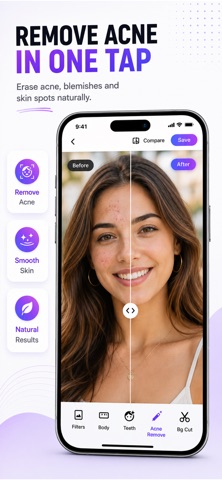
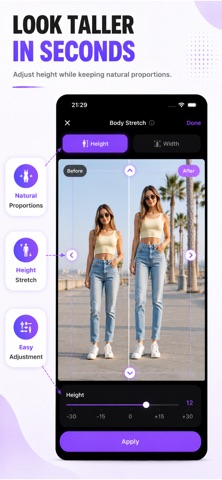
Transform any photo in seconds with powerful AI photo editing tools. Retouch, slim, remove backgrounds, whiten teeth, erase blemishes, blur portraits, and enhance photos in just one tap. Photo Editor gives you powerful and easy-to-use editing tools to create stunning photos right on your iPhone. No experience needed. No complicated tools. Just fast, natural-looking results. Perfect for selfies, portraits, profile pictures, social posts, product photos, and everyday edits. BODY RESHAPE Slim, sculpt, or enhance your body naturally in seconds. Use Auto mode for instant results or Manual mode for more precise control. ACNE AND BLEMISH REMOVER Remove pimples, blemishes, spots, and skin imperfections with natural-looking healing tools while keeping skin texture realistic. TEETH WHITENING Whiten your teeth instantly with clean and natural-looking results. BACKGROUND REMOVER Cut out backgrounds in one tap with precise AI selection. Keep your subject and replace everything else. OBJECT REMOVER Remove unwanted objects, people, distractions, or imperfections from any photo. PORTRAIT BLUR Create a soft DSLR-style background blur and make portraits stand out beautifully. FILTERS AND ADJUSTMENTS Apply premium filters and fine-tune brightness, contrast, saturation, highlights, shadows, warmth, and more. CROP AND RESIZE Crop freely or use ready-made ratios for posts, stories, wallpapers, profile photos, and more. HD AND 4K EXPORT Save your edits in high quality with full-resolution HD and 4K export. HOW IT WORKS Choose any photo Select a tool or use one-tap AI edit Save and share instantly PRIVATE BY DESIGN Your photos stay on your device. No uploads. No account required. Upgrade to Premium for unlimited access to all editing tools, premium filters, HD and 4K export, and watermark-free saving. Privacy Policy: https://www.zenbyte.app/photoeditor/privacy.html Terms of Use: http://apple.com/legal/itunes/appstore/dev/stdeula/
Latest release
What’s New
Performance improvements and bug fixes have been implemented.
Audience growth
Ratings growth
Baseline captured. Growth appears after the crawler observes a changed rating count.
Momentum comes from crawler snapshots for the tracked storefront. “Viral growth signal” means unusually fast recent rating gains; it is an indicator, not download data.
Price tracking
Price intelligence
First snapshot captured. The trend line starts after the next crawler price observation.
- First observed Sep 4, 2026 · 4:12 AM Free
Screenshots