About this app
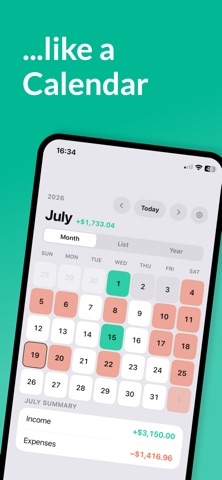
Ever get that end-of-month surprise — because you forgot when rent, electricity, or a streaming subscription was due? MoniCal brings order to your finances by showing income and expenses exactly where they belong: right in the calendar. What MoniCal does for you: Calendar view — See at a glance when each amount is due. Month, week, list, or a compact year overview. Recurring entries — Rent, salary, subscriptions: set them up once, never forget again. Daily, weekly, monthly, or yearly. Reminders — Get notified before up to 3 recurring payments are due. Categories — Organize entries with your own or predefined categories like Housing, Transport, or Leisure. Budgets — Set a monthly limit for a category of your choice and keep your spending in check. Notes — Add details directly to an entry, like contract numbers or payment references. Multilingual — German, English, and French, with a choice of Euro, US Dollar, British Pound, or Swiss Franc. MoniCal Pro — more clarity for €1.29/month: Year overview — All 12 months at a glance Running balance — Your balance is automatically carried forward, so you always know what's left after everything is booked Statistics — Savings rate, spending by category, and detailed balance history Unlimited reminders — Reminders for as many subscriptions and payments as you like, not just the first three Unlimited budgets — Set a monthly budget for as many categories as you like, not just one Supports ongoing development of the app MoniCal stores all your data on your device and automatically backs it up to your personal iCloud. No sign-up, no hidden costs. Your finances. Your rhythm. MoniCal. Terms of Use: https://horizonlabsdev.github.io/MoniCal/terms Privacy Policy: https://horizonlabsdev.github.io/MoniCal/privacy Apple EULA: https://www.apple.com/legal/internet-services/itunes/dev/stdeula/
Latest release
What’s New
New: Custom background color for the calendar, stats, and settings — pick it right in onboarding or anytime in Settings.
Audience growth
Ratings growth
Baseline captured. Growth appears after the crawler observes a changed rating count.
Momentum comes from crawler snapshots for the tracked storefront. “Viral growth signal” means unusually fast recent rating gains; it is an indicator, not download data.
Price tracking
Price intelligence
First snapshot captured. The trend line starts after the next crawler price observation.
- First observed Sep 3, 2026 · 2:16 AM Free
Screenshots