About this app
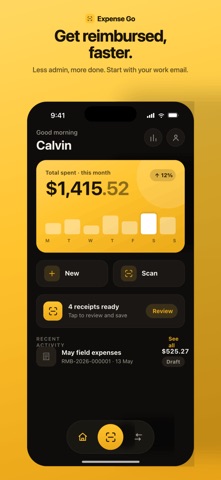
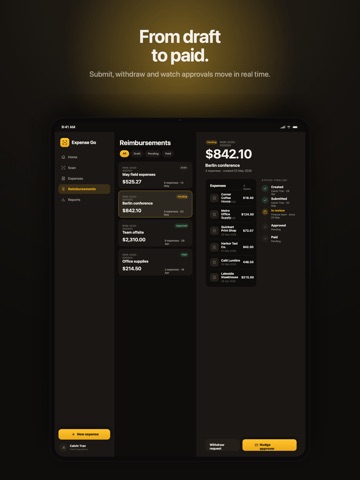
Expense GO — Receipts to reimbursed, minus the busywork. Expense GO turns the most tedious part of work travel into a few taps. Snap a receipt, let AI read and sort every line, bundle your expenses into a request, and track it all the way to paid — no spreadsheets, no shoebox of crumpled paper, no end-of-month dread. Built for employees who are always on the move and want their money back faster. SNAP ANY RECEIPT: Point, shoot, and keep going. Capture a whole trip's worth of receipts in one quick burst, or import a stack straight from your photo library or files. Crumpled, faded, or foreign — Expense Go handles it. LET AI DO THE DATA ENTRY: The moment you upload, AI reads the receipt for you — merchant, date, taxes, and totals captured automatically. No more typing numbers off a faded slip. You just glance and confirm. SMART, EDITABLE CATEGORIES: Every line item is sorted into a spend category by AI — meals, transport, lodging, supplies and more. Disagree with one? Change it with a single tap. Your expenses stay organized without the manual work. ANY CURRENCY, CONVERTED INSTANTLY: Spend abroad without the mental math. Expense Go captures the original amount and converts it for you, so every expense is reimbursement-ready in your home currency. BUNDLE INTO REIMBURSEMENT REQUESTS: Group related expenses into a single request, add a project and a note, and submit for approval. Everything an approver needs, neatly packaged. TRACK FROM DRAFT TO PAID: Follow every request through Draft, Pending, Approved, and Paid in real time. Submit when you're ready, withdraw if something changes, and always know exactly where your money is. DESIGNED TO BE EFFORTLESS: One clear action per screen. A clean, fast interface in light or dark mode. No clutter, no confusion — just the quickest path from receipt to reimbursed. WHY EXPENSE GO • Capture receipts in seconds • AI extraction with line-item detail • Automatic, editable categorization • Built-in multi-currency conversion • Reimbursement bundling and status tracking • Light and dark themes Stop dreading expense reports. Capture as you go, let AI handle the details, and get reimbursed faster. Download Expense Go and make your next trip the easiest one to expense.
Latest release
What’s New
What’s New in Version 2.47 - Clearer Scan Messaging – When a scan can’t be read, the banner now tells you exactly what went wrong and offers helpful next steps. - Automatic Upload Retry – If a network glitch drops an upload, the app will retry automatically (no more “failed to upload” surprises). - Never‑Lost Failed Uploads – Uploads that fail no longer disappear silently; you’ll see the error and can act on it. - Improved Edge‑Case Handling – Fixed a bug where an unknown backend status was shown as “Draft” and corrected a mis‑labelled expense state, making the experience more reliable. Other Recent Improvements (v2.44 → v2.46) - Streamlined Pill UI – Forward‑action pill hosts now include inline Withdraw/Cancel buttons and a centered Scan FAB for faster, more intuitive interactions. - Better Server‑Side Action Logic – The server now decides which actions are available, reducing UI glitches and speeding up response times. - Contract‑Drift Safeguards – New guards protect against API contract changes that could previously cause hidden errors. - Enhanced “Shared with Me” View – Fixed pagination handling so shared items display correctly for every user. - Stability Fixes for Camera & Queue – The camera drain no longer blocks the upload queue, and a per‑job idempotency key prevents duplicate retries. All updates are aimed at giving you a smoother, more transparent expense‑tracking experience. Upgrade now to enjoy the latest reliability and usability enhancements!
Audience growth
Ratings growth
Baseline captured. Growth appears after the crawler observes a changed rating count.
Momentum comes from crawler snapshots for the tracked storefront. “Viral growth signal” means unusually fast recent rating gains; it is an indicator, not download data.
Price tracking
Price intelligence
First snapshot captured. The trend line starts after the next crawler price observation.
- First observed Sep 4, 2026 · 5:06 AM Free
Screenshots