About this app
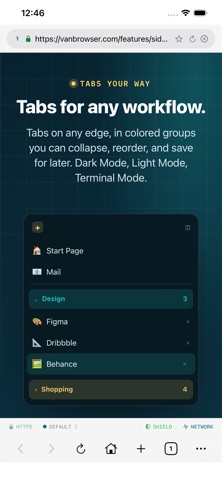
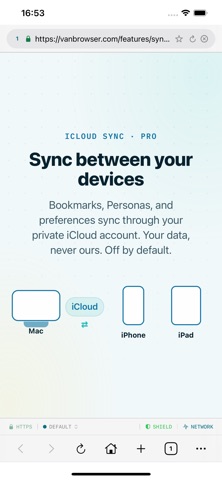
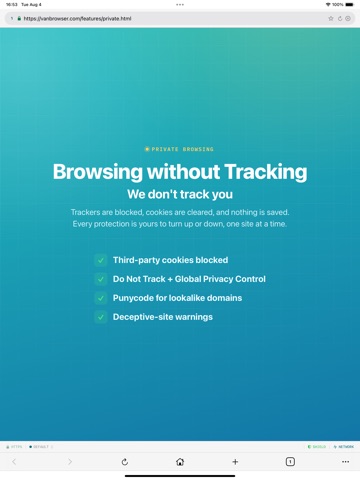
Fast, private, and built natively for Mac, iPhone, and iPad, VanBrowser puts you in control of your browsing experience instead of collecting data about it. Many browsers racing to add AI assistants, cloud services, and increasingly complicated and hidden interfaces. VanBrowser takes a different approach. It is a browser first, designed to help you browse the web with more transparency. NO AI. NONE. VanBrowser includes no AI features. No chatbot. No page summaries. No assistant watching what you browse. No prompts asking you to generate content. What you do in VanBrowser never becomes training data for us because we don't collect it in the first place. We don't collect data: You're not the product. Instead of monetizing your browsing activity, we rely on Pro subscriptions and optional tips to support continued development. SEE WHAT THE WEB IS DOING Most browsers hide what happens behind the scenes. VanBrowser puts that information in front of you. A live status bar shows page load times, transferred data, and resource counts as pages load. Open the Cookies, Network, and Page Info panels to inspect what a site sets, requests, and loads. Advanced users can also send and inspect raw web requests directly. PERSONAS: SEPARATE YOUR ONLINE IDENTITIES Keep work and personal accounts separate without juggling multiple browsers. Personas provide isolated browsing environments with their own cookies and device identities, making it easy to: • Stay logged into multiple accounts at the same time • Keep work and personal browsing separate • Open websites as a clean device • Automatically send specific websites to the correct Persona PRIVACY BY DEFAULT VanBrowser blocks many trackers and ads using maintained blocklists and is designed to give you greater control over your browsing data. History, bookmarks, passwords, and settings are stored locally on your Mac by default. If you use multiple devices, you can optionally enable iCloud sync to share supported data through your own iCloud account. VanBrowser is designed to minimize the collection of user data. We do not operate a cloud service for storing your browsing history, bookmarks, passwords, or synced data. BUILT NATIVELY FOR MAC, IPHONE, AND IPAD VanBrowser is designed specifically for macOS, iPhone, and iPad and feels at home here. Features include: • Tabbed browsing • Bookmarks and bookmarks bar • History and downloads • Reader View • Find in Page • Zoom controls • Built-in password vault • Built-in payment card vault • Per-site controls • Accessibility-focused design ACCESSIBILITY FIRST VanBrowser includes support for VoiceOver, Voice Control, and accessibility-focused customization throughout the app. FREE AND PRO VanBrowser is free to use. Upgrade to Pro to unlock iCloud sync, additional Personas, and other advanced features. A browser should work for you, not advertisers, data brokers, or AI companies. VanBrowser is a browser. That's the point. Terms of Use (EULA): https://www.apple.com/legal/internet-services/itunes/dev/stdeula/
Latest release
What’s New
Your privacy. Your accounts. Your browser. No AI. This version has refinements to ad blocking. Keep work, personal life, and everything in between in their own place. VanBrowser brings privacy and organization to everyday browsing. • Turn tab overload into colorful, organized Workspaces. • Stay signed into different accounts with separate Personas. • Block trackers and explore what websites load behind the scenes. • Enjoy clutter-free reading with Reader View. Start browsing for free. Pro adds more Personas and optional iCloud sync.
Audience growth
Ratings growth
Momentum comes from crawler snapshots for the tracked storefront. “Viral growth signal” means unusually fast recent rating gains; it is an indicator, not download data.
Price tracking
Price intelligence
- First observed Aug 19, 2026 · 5:03 AM Free
Screenshots