About this app
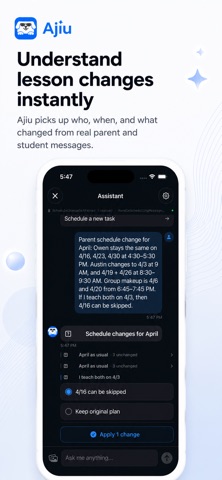
Turn scheduling messages into schedules, tasks, and to-dos. Paste a message into Ajiu. AI understands the dates, people, changes, tasks, and important details—then organizes everything into a plan you can review. From one quick reschedule to an entire week of plans, Ajiu helps you organize more at once without entering everything manually. WHAT YOU CAN DO • Bulk scheduling Turn messages with multiple dates, events, and changes into an organized plan. • Events, tasks & to-dos Ajiu helps separate what belongs on your schedule from what still needs to get done. • Understand real messages Identify dates, times, people, schedule changes, and important context from everyday language. • Catch missing details See when important scheduling information may still need your attention. • Review before saving See what Ajiu understood before anything is added or changed. • Inbox, Tasks & Schedule Keep incoming plans, things to do, and your schedule organized in one place. BUILT FOR REAL-LIFE SCHEDULING Use Ajiu for: • Meetings and appointments • Lessons and classes • Client schedules • Reschedules and cancellations • Weekly planning • Travel plans • Tasks and follow-ups • Multi-event messages Ajiu is especially useful for coaches, instructors, tutors, freelancers, parents, and anyone managing a changing schedule through messages. SIMPLE BY DESIGN Ajiu is built to make scheduling faster without turning into a complicated business-management system. Paste. Organize. Review. Done. CALENDAR SUPPORT Ajiu currently manages events, tasks, and inbox items inside Ajiu. This version does not write directly to Apple Calendar or Google Calendar. SUBSCRIPTION INFORMATION Ajiu Pro may be offered as an auto-renewable subscription. Available plans, duration, and pricing are shown in the app before purchase and may vary by region. Payment is charged to your Apple ID through the App Store. Subscriptions automatically renew unless canceled at least 24 hours before the end of the current subscription period. You can manage or cancel your subscription in your Apple Account settings. Terms of Use (EULA): https://www.apple.com/legal/internet-services/itunes/dev/stdeula/ Ajiu Terms of Service: https://ajiucalendar.com/terms Privacy Policy: https://ajiucalendar.com/privacy
Latest release
What’s New
Bug fixes.
Audience growth
Ratings growth
Baseline captured. Growth appears after the crawler observes a changed rating count.
Momentum comes from crawler snapshots for the tracked storefront. “Viral growth signal” means unusually fast recent rating gains; it is an indicator, not download data.
Price tracking
Price intelligence
First snapshot captured. The trend line starts after the next crawler price observation.
- First observed Sep 4, 2026 · 10:19 AM Free
Screenshots