About this app
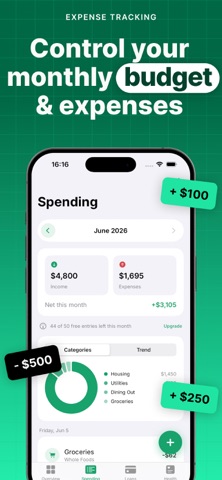
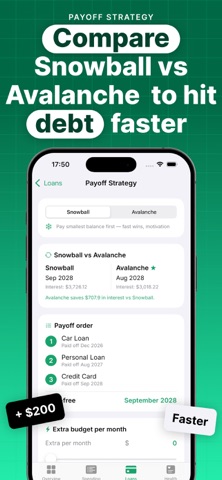
LoanGrid is a simple way to see your money: where your spending goes and how your loans are getting paid off. Log your everyday spending, keep an eye on your loans, and understand how you're really doing — all in one app. No sign-up, no accounts: your data stays on your device and syncs privately through your own iCloud. YOUR SPENDING • Add income and expenses in seconds • Automatic category breakdowns and monthly charts • Month-by-month history • Attach receipt photos YOUR LOANS • Add each loan: balance, interest rate, monthly payment • See an estimated payoff date for each one • Compare Snowball vs Avalanche strategies to see which costs less • "What if I pay extra?" simulator shows how extra payments move your payoff date YOUR FINANCIAL HEALTH • A clear 0–100 score based on savings, payment load, and emergency fund • Detailed breakdown with tips to improve • Goals and money challenges • Short articles for better habits PRIVATE BY DESIGN • No account, and we never see your finances • Data lives on your device and your private iCloud • Lock the app with Face ID • Works in your currency (USD, EUR, GBP, UAH, CAD, AUD, PLN and more) • English, Spanish and Ukrainian • Light and dark mode FREE & PRO LoanGrid is free and supported by ads. Upgrade to Pro to remove ads and unlock everything: • Unlimited loans, goals and expense entries • Snowball & Avalanche calculators • Detailed health score breakdown • PDF reports (month & year) and CSV export • Receipt photos Pro is an auto-renewable subscription (monthly or yearly). Payment is charged to your Apple ID and renews automatically unless cancelled at least 24 hours before the period ends. Manage or cancel anytime in Settings. Terms of Use: https://www.apple.com/legal/internet-services/itunes/dev/stdeula/
Latest release
What’s New
• Recurring transactions — mark an entry as weekly, monthly, or yearly and it's added automatically. • Loan payment reminders — a heads-up a few days before each payment is due (turn on in Settings). • Performance improvements and small fixes.
Audience growth
Ratings growth
Baseline captured. Growth appears after the crawler observes a changed rating count.
Momentum comes from crawler snapshots for the tracked storefront. “Viral growth signal” means unusually fast recent rating gains; it is an indicator, not download data.
Price tracking
Price intelligence
First snapshot captured. The trend line starts after the next crawler price observation.
- First observed Aug 26, 2026 · 11:16 PM Free
Screenshots