About this app
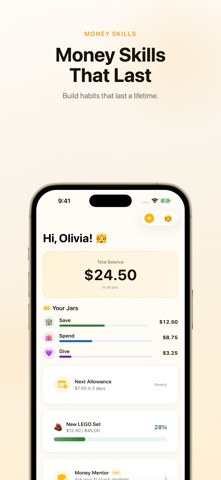
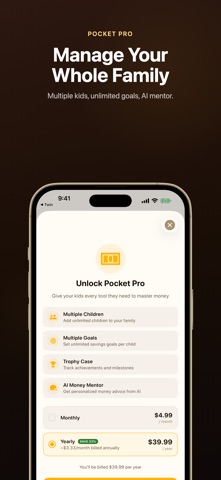
Pocket makes learning about money fun for kids - and stress-free for parents. With the proven 3-Jar method, children learn to Save, Spend, and Give with purpose. Every dollar has a place, every goal is tracked, and every milestone is celebrated. SAVE JAR - Build smart habits Set savings goals and watch progress bars fill up. Kids love seeing how close they are to their dream purchase. The goal calculator shows exactly how many more allowances until they get there. SPEND JAR - Everyday money Track spending money for snacks, games, and fun. Kids learn the value of a dollar by managing their own Spend jar without parental micro-management. GIVE JAR - Share with kindness 10% to Give teaches generosity from day one. Kids choose causes they care about - a habit that lasts a lifetime. ALLOWANCE TRACKER Set weekly, bi-weekly, or monthly allowances. Pocket automatically calculates the next payment date and splits the amount across all three jars based on your family's percentages. SAVINGS GOALS Create goals for anything - a new toy, a video game, a bicycle. The Goal Calculator shows estimated completion dates so kids stay motivated. AI MONEY MENTOR (Pro) An AI coach that gives personalized, age-appropriate financial guidance. Kids can ask anything about saving, spending, and giving wisely. MULTIPLE CHILDREN (Pro) Manage every child's jars and goals from one parent account. Each child gets their own dedicated dashboard. TROPHY CASE (Pro) Archive completed goals as trophies. Kids build a visual history of financial wins - creating pride and motivation. DESIGNED FOR REAL FAMILY LIFE - Clean, intuitive design kids can navigate themselves - Full dark mode support - Works offline - all data stored locally with iCloud sync - No ads, no tracking, complete privacy - Sign in with Apple for secure family accounts START YOUR FAMILY'S MONEY JOURNEY The best financial lessons start young. Download Pocket today and give your kids the tools they need to build a healthy relationship with money - one jar at a time. Terms of Use (EULA): https://www.apple.com/legal/internet-services/itunes/dev/stdeula/
Latest release
What’s New
What's New - Dark Mode: card shadows and overlays now display correctly in dark mode - Delete Transactions: swipe left on any transaction to remove it - Balance Fix: deleting a transaction automatically corrects your jar balance - Accessibility: improved VoiceOver labels on child-selector buttons - Performance: transaction history loads faster
Audience growth
Ratings growth
Momentum comes from crawler snapshots for the tracked storefront. “Viral growth signal” means unusually fast recent rating gains; it is an indicator, not download data.
Price tracking
Price intelligence
- First observed Aug 15, 2026 · 2:45 PM Free
Screenshots