About this app
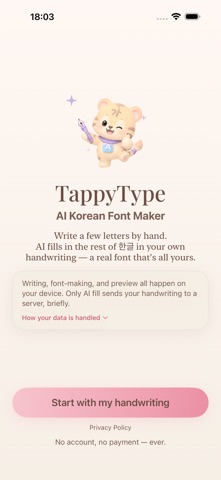
Your handwriting becomes a real font. TappyType turns your handwriting into a Korean font, right on your iPad with Apple Pencil. Watch a live preview fill up with your writing as you go, then export a real font file (.ttf). How it works 1. Write characters along the guides — baselines and tracing hints help you. 2. The live preview instantly renders sentences in your handwriting. 3. Finish the basic set, then one tap of AI Generate fills in 2,000+ remaining Hangul characters in your style. 4. Export as .ttf and use it anywhere fonts work: GoodNotes, Procreate, Keynote, Word. AI Generate Korean has 11,172 syllables, which made handwriting fonts notoriously hard to make. TappyType's AI learns your style from the characters you write and draws the rest to match. A few characters are enough for a complete font. Your data stays yours Writing, preview, and font building all happen on your iPad. Only when you use AI Generate, handwriting images are sent to our server — processed in real time and immediately discarded, never stored. No accounts, no ads, no tracking. Made for - Decorating your journal and GoodNotes pages with your own handwriting - Creating cards, video captions, and vlog titles with a handwritten feel - Preserving a parent's or friend's handwriting as a font — a gift that lasts - Designers who need a personal Korean typeface Write a few characters today. Once your handwriting becomes a font, writing never feels the same.
Latest release
What’s New
Write just a few letters, and AI fills in the rest in your own hand. - The generated letters now show right inside each cell. You can see at a glance which ones came out great and which need a touch, so getting to a handwriting you love is faster. - Tap any letter in the grid to jump straight into editing it. - Fixed a crash that could close the app when you tapped AI fill on a font with a lot of letters already written. It now finishes no matter how much you have written, and it gets started faster too. - Refined the pencil weight and the collapse and expand controls for a smoother flow, plus small bug fixes.
Audience growth
Ratings growth
Baseline captured. Growth appears after the crawler observes a changed rating count.
Momentum comes from crawler snapshots for the tracked storefront. “Viral growth signal” means unusually fast recent rating gains; it is an indicator, not download data.
Price tracking
Price intelligence
First snapshot captured. The trend line starts after the next crawler price observation.
- First observed Sep 4, 2026 · 1:46 AM Free
Screenshots