About this app
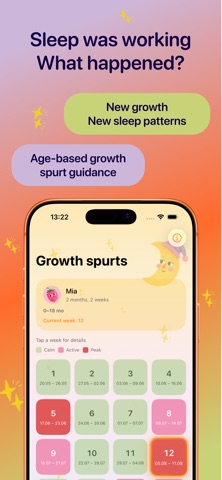
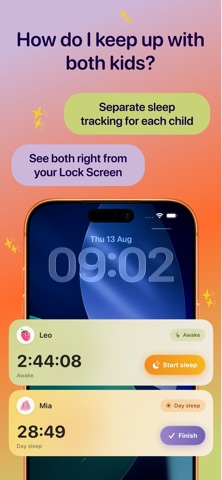
Baby Sleep Tracker Little Nap helps tired parents log naps and night sleep in seconds and finally see the bigger picture. Designed to be calm and private: your baby's sleep data stays on your device. FEATURES • One-tap sleep tracking for naps and night sleep • Clear daily timeline and weekly sleep chart • Sleep statistics to spot patterns over time • Growth-spurt calendar to understand fussy days • Multiple child profiles • Smart reminders for sleep and wake windows • Home Screen widget for quick logging • CSV export to share with your pediatrician • Sign in with Apple or Google to keep your profile safe PREMIUM Unlock statistics, CSV export, the growth-spurt calendar, multiple profiles, and smart reminders with Premium (weekly or yearly, with a free trial). Your privacy matters: no third-party analytics, no ads, no tracking. Baby and sleep data is stored on your device. This app is an informational tool and does not provide medical advice. Always consult your pediatrician with health questions. ——— Terms of Use (EULA): https://kindrachuchka.github.io/babysleep-legal/terms.html Privacy Policy: https://kindrachuchka.github.io/babysleep-legal/privacy-policy.html
Latest release
What’s New
Growth spurts, rewritten week by week Every week from 1 to 78 now has its own text: what changes right now, why the week can feel intense, and what usually helps. No more talking in months instead of weeks, and no more reading almost the same paragraph two weeks in a row. Fixed - The Lock Screen and Dynamic Island timer now stays in sync with the app - Note, Edit and Delete on the widget now work and take you straight to the right screen - "Sleep overlaps another record" is no longer a dead end: save the conflict-free part, adjust the times or delete the sleep - Dates in the Sleep by day chart scroll together with their columns - Activity window is now expected awake time divided by (day naps + 1), and the explanation says what it really means: the window ends when your baby falls asleep, so start settling 5-10 minutes earlier Also - New launch screen - Day comparison is part of Premium - Smaller fixes across statistics, the timeline and the paywall Thank you for every message and review. Most of this list came from them.
Audience growth
Ratings growth
Baseline captured. Growth appears after the crawler observes a changed rating count.
Momentum comes from crawler snapshots for the tracked storefront. “Viral growth signal” means unusually fast recent rating gains; it is an indicator, not download data.
Price tracking
Price intelligence
First snapshot captured. The trend line starts after the next crawler price observation.
- First observed Aug 26, 2026 · 5:44 PM Free
Screenshots