About this app
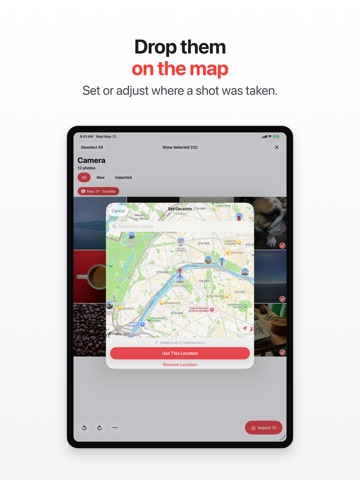
Capture brings the photos and videos off your camera, memory card, or USB drive and into your Photos library. Quickly, privately, and with no duplicates. Plug in a camera, SD card, or USB drive, pick the shots you want, and Capture imports them straight into Photos with their original capture date and GPS location intact. It checks every item against your existing library first, so you never end up with the same photo twice. And before anything imports, you can fix any shot's date, location, file name, and camera details, either on its own or across a whole batch. EVERYTHING STAYS ON YOUR DEVICE No account. No cloud. No servers. Capture works entirely offline, and your photos never leave your iPhone or iPad. SKIP THE DUPLICATES Capture compares each incoming photo and video against your whole Photos library, even rotated copies, and flags anything you've already imported. You only bring over what's new. PRESERVE WHAT MATTERS Your original capture date and GPS location are kept, so imports land in the right place on your timeline and map. Photo rotation rewrites only the orientation tag, with no re-compression, and RAW files (CR3, NEF, ARW, DNG and more) import exactly as captured. EDIT EVERY DETAIL Capture isn't just a copier. Open any shot and change what you need before it lands in Photos: • Capture date and time: fix one shot, or shift a whole batch while keeping the spacing between them • Location: set or adjust it on a map • Camera info: make and model, lens, ISO, aperture, shutter speed, focal length • Copyright and artist (byline) • File name, plus lossless rotation • A full-screen preview of any shot Fix a single shot, or apply the same change to many at once. Your card originals are never touched. Edits are written only into the copy that goes to Photos. (RAW files import as is. Their date and location still apply, but rotation and camera edits don't.) BUILT FOR REAL SHOOTS Handles large imports and video, with live progress and an accurate time estimate. Pinch to resize the grid. Designed for iPhone and iPad. FREE TO START Your first import is on us, so bring over the whole card with no limits. After that, import up to 5 items a day for free, or go Unlimited with a monthly, quarterly, or yearly plan, or a one-time Lifetime purchase. Capture is the simple, private way to get your camera's photos where they belong. — Unlimited is an auto-renewing subscription (monthly, quarterly, or yearly); a one-time Lifetime unlock is also available, and prices are shown in the app before you buy. Payment is charged to your Apple Account at confirmation of purchase. Subscriptions renew automatically unless turned off at least 24 hours before the current period ends; you can manage or cancel anytime in your Apple Account settings. Privacy Policy: https://capture.karololszanski.com/privacy Terms of Use: https://www.apple.com/legal/internet-services/itunes/dev/stdeula/
Latest release
What’s New
Capture is now more accessible: • Full VoiceOver support throughout the photo viewer and import • Respects Reduce Motion and Larger Text, and works in Dark Mode • More reliable import from cameras, including camera details and duplicate detection • Various fixes and refinements
Audience growth
Ratings growth
Baseline captured. Growth appears after the crawler observes a changed rating count.
Momentum comes from crawler snapshots for the tracked storefront. “Viral growth signal” means unusually fast recent rating gains; it is an indicator, not download data.
Price tracking
Price intelligence
First snapshot captured. The trend line starts after the next crawler price observation.
- First observed Aug 13, 2026 · 2:40 PM Free
Screenshots