About this app
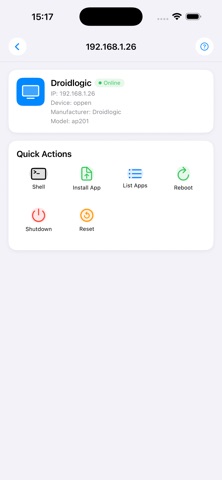
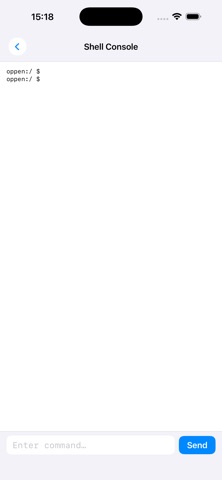
ADB Box Remote Control lets you manage any TV box wirelessly from your phone, using the Debug Bridge (ADB) protocol over your local Wi-Fi network. Automatic discovery Scan your network with one tap. The app detects all TV boxes with ADB enabled and connects automatically when only one is found. You can also add a device manually by IP address. Remote control at your fingertips Once connected, a clean dashboard gives you instant access to the most useful actions: - Reboot — restart the box remotely - Shutdown — send a power-off command - Factory reset — wipe the box back to defaults - List installed apps — run "pm list packages" and browse the output Install APKs wirelessly Pick any APK from your phone's storage. The app pushes it to the box and installs it automatically, with a real-time progress screen showing every step. Interactive shell console Open a live ADB shell and run any command directly on the box. Output streams back in real time. The console stays open while you navigate the rest of the app. Device info at a glance The connection screen shows the box's manufacturer, model, IP address, and whether it is running as root. Requirements - TV box must have Developer Options and Network ADB (ADB over Wi-Fi) enabled - Phone and box must be on the same Wi-Fi network
Latest release
What’s New
New numeric keypad for entering device IP addresses — no system keyboard needed App icon and name shown in the main screen header Scan button now acts as a stop button during active scans, with an animated indicator Scanning stops automatically when you tap a device to connect Device status refreshes automatically every 5 seconds while browsing Offline devices can no longer be accidentally tapped Screen stays on during file transfers and installs Version info added to the Help page Blue icon for device rows for better visual clarity Full dark mode support throughout the app
Audience growth
Ratings growth
Baseline captured. Growth appears after the crawler observes a changed rating count.
Momentum comes from crawler snapshots for the tracked storefront. “Viral growth signal” means unusually fast recent rating gains; it is an indicator, not download data.
Price tracking
Price intelligence
First snapshot captured. The trend line starts after the next crawler price observation.
- First observed Aug 24, 2026 · 8:53 AM Free
Screenshots