About this app
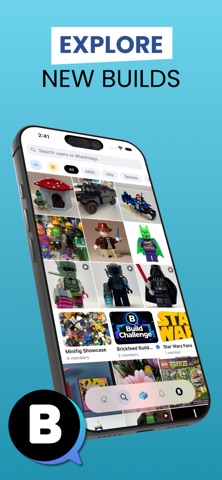
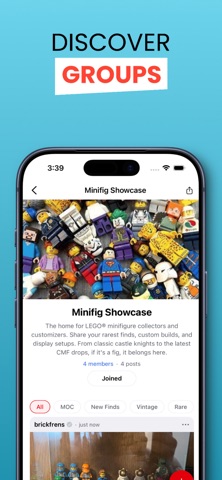
Brickfeed is the social app built for LEGO® fans. Share your builds, discover incredible creations from builders around the world, and connect with a community that loves LEGO® as much as you do. Share Your Builds Post photos and videos of your LEGO® creations. Tag the set number, add a theme, and let the community see what you've built. Discover Builders Explore a feed full of incredible builds from the global LEGO® community. Follow your favorite builders and never miss a new creation. Join Groups Create and join communities built around the themes you love. Share posts, vote on polls, and take part in build challenges with fellow fans. Buy and Sell Browse the Brickfeed marketplace to find LEGO® sets, minifigs, and parts from sellers in the community. List your own items and connect with buyers directly. Connect and Engage Like, comment, and save posts. Send direct messages to fellow builders. Build relationships around the bricks you love. Support the Community Show your dedication with a Supporter, Pro Builder, or Master Builder badge on your profile. Build Logs A new way for badge holders to document their builds from start to finish, post by post. LEGO® is a trademark of the LEGO® Group, which does not sponsor, authorize, or endorse this app. Terms of Use: https://www.zanellostudios.com/terms-and-conditions-brickfeed
Latest release
What’s New
What's New Build Instructions Library Share your building instructions directly on your profile. Upload PDFs or images with piece count, difficulty level, theme tag, compatible set numbers, and a parts list link. Tap any instruction to preview details before viewing. Available to Supporter badge and above. New Profile Tabs Profiles now have four tabs: Posts, Listings, Library, and Saved. Browse a creator's marketplace listings and uploaded instructions without leaving their profile. Your saved posts live in their own tab too. Improvements - Fixed a bug where videos posted from Android appeared as a static image when viewed on iOS - Swiping down now dismisses the post type selector sheet - Few other bugs we caught in the trap got fixed as well
Audience growth
Ratings growth
Baseline captured. Growth appears after the crawler observes a changed rating count.
Momentum comes from crawler snapshots for the tracked storefront. “Viral growth signal” means unusually fast recent rating gains; it is an indicator, not download data.
Price tracking
Price intelligence
First snapshot captured. The trend line starts after the next crawler price observation.
- First observed Aug 19, 2026 · 3:17 PM Free
Screenshots